Как я решил вкатиться в Android разработку через вайбкодинг. Часть 2. Ну или разработка мобильного приложения через ИИ

В прошлой части я остановился на том что собрал свое приложение, наладил работу и залил в google play. Здесь будет не то чтобы полноценный гайд, скорее тот путь что я прошел и попытка получить опыт [1] в написании статьи
Скажу честно код давно перевалил за 2000 строк в одном файле. И я поставил себе разные задачи. Одна из них логически разделить код на разные блоки. Экраны в одном месте, работа с api в другом месте.
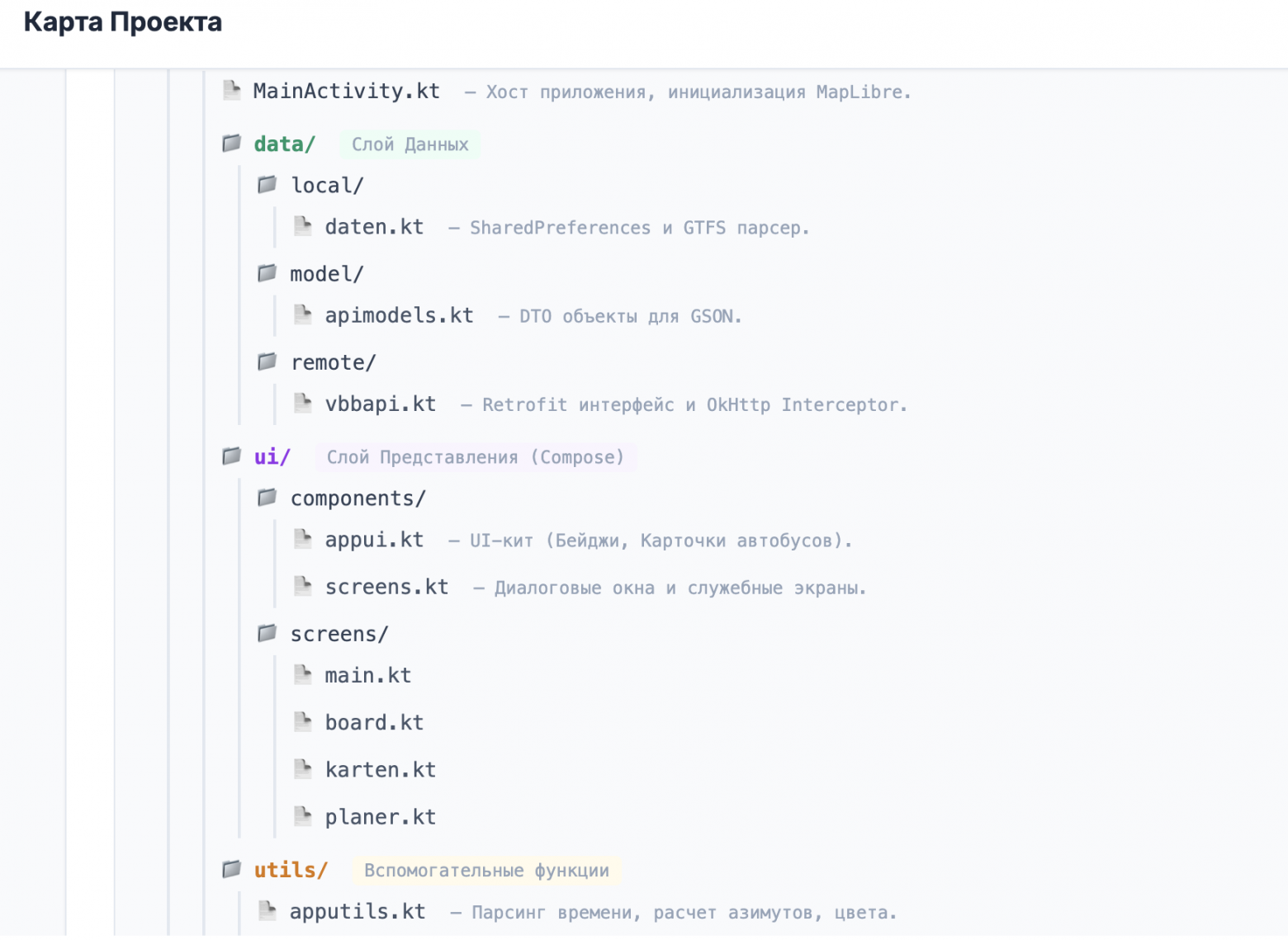
вторая для меня амбициозная задача которую я сам перед собой поставил (ну может и не амбициозная). Это векторные карты вместо растровых
третья задача это получать данные напрямую от поставщика данных без использования общедоступных v6.vbb.rest bvg.res db.rest. Все это было Frontend, а для дальнейших шагов нужен Backend.
Действие первое – Backend.
В целом устроено у меня так:
Docker, Bash, node.js, python, SQL-Lite. Для каждой задачи свой инструмент.
Итак. Чтобы мы смогли использовать карты не получится просто поменять код приложения, подключить от куда-то векторные карты например maplibre или MapBox. Вернее конечно можно зарегистрироваться получить ключи api и настроить, но мы быстро упремся в потолок бесплатных запросов в случае если количество пользователей будет большое. Остается два варианта:
-
либо мы покупаем платный доступ
-
либо поднимаем свой сервер
Я выбрал второй варинат
Поднимаем сервер.
Перебрав несколько вариантов я остановился на сервере от Oracle , Oracle Cloud Free Tier (не реклама). Данное решение что выбрал я покрывает все мои задачи и запросы.
Мой стек такой, а самое главное бесплатно навсегда:
Ampere ARM 4 ядра
24 Gb RAM
200 Gb ROM
OS Ubuntu 24
План такой:
-
Регистрируемся на сайте
-
Выбираем регион и подтверждаем личность картой
-
Далее создаем виртуальную вычислительную машину.
-
Создаем публичную виртуальную сеть и подсеть.
-
Обязательно загружаем ключи SSH
-
Начинаем квест, а как нам получить это все бесплатно и поймать свободное место.
В чем собственно у меня возникла проблема: при попытке создать машину когда прошел все пункты мне выдало ошибку [2] что нет свободных мест попробуйте позже. Варианта решения собственно два или три
-
Мы все сохраняем как стек и запускаем пытаясь создать ВМ
-
Используем скрипты которые будут это делать сами тем самым ловить момент
-
Мы меняем учетную запись с бесплатной на оплата по факту. Что мы получаем: пропуск очереди и ожидание, бесплатный сервер на вечно. Главное настроить бюджет чтобы не ткнуть не туда и не попасть на бабки.
Подключаемся к серверу
Мы используем уже сгенерированные ключи. Подключаемся через ssh
ssh -i "ssh.key" ubuntu@"ваш IP без кавычек"[3]
когда мы на сервере можем преступить к следующей части
Действие второе – карты
Для карт нам понадобиться Docker, но сначала обновимся и уберем ограничения фаервола так как у самого Oracle есть собственный фаервол.
sudo apt update && sudo apt upgrade -y # 1. Сбрасываем все правила блокировки внутри sudo iptables -F sudo iptables -X sudo iptables -t nat -F sudo iptables -t nat -X sudo iptables -t mangle -F sudo iptables -t mangle -X # 2. Разрешаем всё (мы будем блочить через сайт Oracle) sudo iptables -P INPUT ACCEPT sudo iptables -P FORWARD ACCEPT sudo iptables -P OUTPUT ACCEPT # 3. Делаем это вечным (чтобы после перезагрузки не сбросилось) # Скрипт спросит "Save current IPv4 rules?" -> Отвечай YES sudo apt install iptables-persistent -y sudo netfilter-persistent save[3]
ставим докер
curl -fsSL https://get.docker.com -o get-docker.sh sudo sh get-docker.sh[3]
добавим себя в группу админов докера:
sudo usermod -aG docker ubuntu newgrp docker[3]
Грузим карты
Создаем папку
mkdir ~/map-project && cd ~/map-project mkdir data[3]
Качаем карты, у меня будет Германия.
cd ~/map-project wget -P ./data https://download.geofabrik.de/europe/germany-latest.osm.pbf[3]
После загрузки открываем конфиг
nano docker-compose.yml[3]
services: tileserver: image: maptiler/tileserver-gl container_name: map-engine restart: always volumes: - ./data:/data ports: - "8100:8080"[3]
Мы берем внешний порт 8100 (который открыт) и перенаправляем его на внутренний 8080.
ну и запускаем:
docker run -e JAVA_OPTS="-Xmx20g" -v "$(pwd)/data":/data ghcr.io/onthegomap/planetiler:latest --download --osm-path /data/germany-latest.osm.pbf --output /data/germany.mbtiles[3]
Теперь чтобы это коннектилось с приложением нам нужен домен, так как android просто так отказывается работать только по ip без сертификата ssl. Быть может я ошибаюсь.
Один из вариантов duckdns.org позволяет бесплатно получить поддомен и сертификат к нему.
Чтобы все это заработало нам нужен проксисервер. ngnix-proxy
mkdir ~/proxy && cd ~/proxy nano docker-compose.yml[3]
services: app: image: 'jc21/nginx-proxy-manager:latest' restart: unless-stopped ports: - '80:80' # Вход для http (сайт) - '81:81' # Вход для админки - '443:443' # Вход для https (ssl) volumes: - ./data:/data - ./letsencrypt:/etc/letsencrypt[3]
Теперь переходим на: твой_IP_Adresse:81
-
Нажимаем: Proxy Hosts.
-
Далее: Add Proxy Host.
-
Domain Names: вписываем наш домен (например, твой_домен.duckdns.org [4]).
-
Scheme: http
-
Forward Host: Пишем свой IP-адрес сервера (тот же, по которому ты заходишь).
-
Forward Port: 8100 (порт нашей карты).
-
Включаем галочки: Block Common Exploits и Websockets Support.
-
Переходим на вкладку SSL (в этом же окне):
-
В выпадающем списке выбераем: Request a new SSL Certificate.
-
Ставим галочку Force SSL (чтобы был замочек).
-
Галочку I Agree to the Let’s Encrypt Terms.
-
Нажми Save.
Теперь можем перейти по адресу домена и откроются карты.
Теперь нам остается научить приложение работать с картами. В векторных картах в отличии от растровых OSM есть проблема которая прямо выходит из их преимущества, а именно слои. Из-за обновления слоев пришлось принудительно заставить выводить значки транспорта и остановок на самые верхние слои, иначе они прятались между слоев.
Код приложения работающего с картами такой. Я убрал тут большую часть импортов
import org.maplibre.android.MapLibre import org.maplibre.android.annotations.IconFactory import org.maplibre.android.annotations.Marker import org.maplibre.android.annotations.MarkerOptions import org.maplibre.android.annotations.Polyline import org.maplibre.android.annotations.PolylineOptions import org.maplibre.android.camera.CameraPosition import org.maplibre.android.camera.CameraUpdateFactory import org.maplibre.android.geometry.LatLng import org.maplibre.android.geometry.LatLngBounds import org.maplibre.android.location.LocationComponentActivationOptions import org.maplibre.android.maps.MapLibreMap import org.maplibre.android.maps.MapView import org.maplibre.android.style.layers.PropertyFactory import org.maplibre.android.style.layers.SymbolLayer import org.maplibre.android.style.layers.FillExtrusionLayer import org.maplibre.android.style.expressions.Expression.get import org.maplibre.android.style.expressions.Expression.has import org.maplibre.android.style.sources.GeoJsonSource import org.maplibre.geojson.Feature import org.maplibre.geojson.FeatureCollection import org.maplibre.geojson.Point import java.util.ArrayList import kotlin.math.atan2 import kotlin.math.cos import kotlin.math.sin // --- КОНСТАНТЫ --- private const val STYLE_DAY = "https://oleg-vbb-maps.duckdns.org/styles/osm-bright/style.json" private const val STYLE_NIGHT = "https://oleg-vbb-maps.duckdns.org/styles/dark-matter/style.json" private const val TAG = "MAP_PURE_API" data class MarkerData(val marker: Marker, var lastLat: Double, var lastLon: Double, var bearing: Float) data class VehicleStyle(val bgColor: Color, val txtColor: Color) data class TransportFilter(val id: String, val label: String, val icon: ImageVector, val color: Color) val FILTERS = listOf( TransportFilter("bus", "Bus", Icons.Default.DirectionsBus, Color(0xFFB6005B)), TransportFilter("tram", "Tram", Icons.Default.Tram, Color(0xFFF0AC00)), TransportFilter("suburban", "S-Bahn", Icons.Default.Train, Color(0xFF008D4F)), TransportFilter("subway", "U-Bahn", Icons.Default.Subway, Color(0xFF0065AE)), TransportFilter("regional", "Bahn", Icons.Default.Train, Color(0xFFF01414)) ) @Composable fun FullMapScreen( initialLat: Double, initialLon: Double, journeyToShow: Journey? = null, onShowOnMap: (String) -> Unit, onStopRequest: (StopLocation) -> Unit, onBuildRouteTo: (Double, Double, String) -> Unit, onCloseRoute: () -> Unit, startNavigationImmediately: Boolean = false, tripFromOutside: SelectedTrip? = null, isDarkTheme: Boolean ) { var selectedTrip by remember { mutableStateOf(tripFromOutside) } var showFullSchedule by remember { mutableStateOf(false) } val activeFilters = remember { mutableStateListOf<String>() } LaunchedEffect(tripFromOutside) { selectedTrip = tripFromOutside } Box(Modifier.fillMaxSize()) { LiveMapDialog( initialLat = initialLat, initialLon = initialLon, journeyToShow = journeyToShow, selectedTrip = selectedTrip, activeFilters = activeFilters, isDarkTheme = isDarkTheme, onVehicleClick = { selectedTrip = it }, onStopClick = onStopRequest, onMapClick = { selectedTrip = null; onCloseRoute() } ) MapFilterBar( filters = FILTERS, activeFilters = activeFilters, onToggle = { id -> if (activeFilters.contains(id)) activeFilters.remove(id) else activeFilters.add(id) }, modifier = Modifier.align(Alignment.TopCenter).padding(top = 48.dp) ) if (selectedTrip != null && !showFullSchedule) { Box(modifier = Modifier.align(Alignment.BottomCenter)) { VehicleInfoCard(trip = selectedTrip!!, onClose = { selectedTrip = null; onCloseRoute() }, onShowSchedule = { showFullSchedule = true }) } } } if (selectedTrip != null && showFullSchedule) { RouteDialog(trip = selectedTrip!!, onDismiss = { showFullSchedule = false }, onStopClick = { stop -> selectedTrip = null showFullSchedule = false onStopRequest(stop) }) } } @Composable fun LiveMapDialog( initialLat: Double, initialLon: Double, journeyToShow: Journey? = null, selectedTrip: SelectedTrip? = null, activeFilters: List<String>, isDarkTheme: Boolean, onVehicleClick: (SelectedTrip) -> Unit, onStopClick: (StopLocation) -> Unit, onMapClick: () -> Unit ) { val context = LocalContext.current val lifecycleOwner = LocalLifecycleOwner.current val scope = rememberCoroutineScope() val markersMap = remember { mutableMapOf<String, MarkerData>() } var currentPolyline by remember { mutableStateOf<Polyline?>(null) } val routeStopMarkers = remember { mutableListOf<Marker>() } var mapLibreMap by remember { mutableStateOf<MapLibreMap?>(null) } var isReady by remember { mutableStateOf(false) } // Настройки стилей для меню val styles = listOf("Светлая" to STYLE_DAY, "Темная" to STYLE_NIGHT) var currentStyleUrl by remember { mutableStateOf(if (isDarkTheme) STYLE_NIGHT else STYLE_DAY) } var showStyleMenu by remember { mutableStateOf(false) } val mapView = remember { MapView(context).apply { onCreate(null) getMapAsync { map -> mapLibreMap = map map.cameraPosition = CameraPosition.Builder().target(LatLng(initialLat, initialLon)).zoom(14.0).tilt(45.0).build() // Клик по остановке map.addOnMapClickListener { point -> val screenPoint = map.projection.toScreenLocation(point) val features = map.queryRenderedFeatures(screenPoint, "layer-stops") if (features.isNotEmpty()) { val feature = features.first() val id = feature.getStringProperty("id") ?: "" val name = feature.getStringProperty("name") ?: "Остановка" // Парсим через Gson, чтобы обойти строгий конструктор val jsonStr = """{"type":"stop", "id":"$id", "name":"$name"}""" val stopObj = Gson().fromJson(jsonStr, StopLocation::class.java) onStopClick(stopObj) true } else { onMapClick() true } } // Клик по транспорту map.setOnMarkerClickListener { marker -> val d = marker.snippet?.split("###") ?: listOf() if (d.size >= 3) { val style = getBerlinColor(marker.title, d[0]) onVehicleClick(SelectedTrip(d[1], marker.title ?: "", d[0], style.bgColor, style.txtColor, d[2], d[2])) } true } } } } DisposableEffect(lifecycleOwner) { val observer = LifecycleEventObserver { _, event -> when (event) { Lifecycle.Event.ON_START -> mapView.onStart() Lifecycle.Event.ON_RESUME -> mapView.onResume() Lifecycle.Event.ON_PAUSE -> mapView.onPause() Lifecycle.Event.ON_STOP -> mapView.onStop() Lifecycle.Event.ON_DESTROY -> mapView.onDestroy() else -> {} } } lifecycleOwner.lifecycle.addObserver(observer) onDispose { lifecycleOwner.lifecycle.removeObserver(observer) } } Box(Modifier.fillMaxSize()) { AndroidView(factory = { mapView }, modifier = Modifier.fillMaxSize(), update = {}) // --- БЫСТРАЯ ЗАГРУЗКА КАРТЫ БЕЗ КОСТЫЛЕЙ --- LaunchedEffect(currentStyleUrl, mapLibreMap) { val map = mapLibreMap ?: return@LaunchedEffect isReady = false markersMap.clear() // Отдаем URL напрямую, MapLibre сам всё скачает и закэширует! map.setStyle(currentStyleUrl) { style -> // Восстанавливаем остановки if (style.getSource("src-stops") == null) style.addSource(GeoJsonSource("src-stops")) style.addImage("s-icon", drawableToBitmap(createHaltestelleIconInternal(context))) if (style.getLayer("layer-stops") == null) { style.addLayer(SymbolLayer("layer-stops", "src-stops").apply { setProperties( PropertyFactory.iconImage("s-icon"), PropertyFactory.iconAllowOverlap(true), PropertyFactory.iconIgnorePlacement(true) ) }) } // --- МЯГКОЕ 3D --- try { val layer = FillExtrusionLayer("3d-buildings", "openmaptiles") layer.sourceLayer = "building" layer.setFilter(has("render_height")) // Показываем 3D только при сильном приближении (от 15.5 зума) layer.minZoom = 15.5f layer.setProperties( PropertyFactory.fillExtrusionHeight(get("render_height")), PropertyFactory.fillExtrusionColor(if (currentStyleUrl == STYLE_NIGHT) android.graphics.Color.DKGRAY else android.graphics.Color.LTGRAY), // Делаем здания полупрозрачными (0.4f вместо 0.7f) PropertyFactory.fillExtrusionOpacity(0.4f) ) style.addLayer(layer) } catch (e: Exception) { Log.e(TAG, "3D error") } isReady = true tryEnableLocation(map, context) } } // --- КНОПКИ УПРАВЛЕНИЯ КАРТОЙ --- Column( modifier = Modifier.align(Alignment.CenterEnd).padding(16.dp), verticalArrangement = Arrangement.spacedBy(16.dp), horizontalAlignment = Alignment.End ) { Box { FloatingActionButton( onClick = { showStyleMenu = true }, containerColor = MaterialTheme.colorScheme.surface ) { Icon(Icons.Default.Layers, contentDescription = "Стили", tint = MaterialTheme.colorScheme.primary) } DropdownMenu( expanded = showStyleMenu, onDismissRequest = { showStyleMenu = false } ) { styles.forEach { (name, url) -> DropdownMenuItem( text = { Text(name) }, onClick = { currentStyleUrl = url showStyleMenu = false } ) } } } FloatingActionButton( onClick = { val map = mapLibreMap ?: return@FloatingActionButton if (map.locationComponent.isLocationComponentActivated && map.locationComponent.isLocationComponentEnabled) { map.locationComponent.lastKnownLocation?.let { map.animateCamera(CameraUpdateFactory.newLatLngZoom(LatLng(it.latitude, it.longitude), 15.0)) } } }, containerColor = MaterialTheme.colorScheme.surface ) { Icon(Icons.Default.MyLocation, null, tint = Color(0xFF007AFF)) } } } // --- РАДАР И ОСТАНОВКИ --- LaunchedEffect(isReady, activeFilters.toList(), selectedTrip) { if (!isReady) return@LaunchedEffect while (isActive) { val map = mapLibreMap ?: break val box = map.projection.visibleRegion.latLngBounds withContext(Dispatchers.IO) { try { val radarRes = ApiClient.service.getRadar(box.latitudeNorth, box.longitudeWest, box.latitudeSouth, box.longitudeEast).execute() val vehicles = mutableListOf<RadarVehicle>() radarRes.body()?.let { b -> if (b.isJsonArray) vehicles.addAll(Gson().fromJson(b, Array<RadarVehicle>::class.java)) else if (b.asJsonObject.has("movements")) vehicles.addAll(Gson().fromJson(b.asJsonObject.get("movements"), Array<RadarVehicle>::class.java)) } val target = map.cameraPosition.target ?: LatLng(initialLat, initialLon) val stops = ApiClient.service.getNearbyStations(target.latitude, target.longitude, 1200).execute().body() ?: emptyList() withContext(Dispatchers.Main) { val iconFactory = IconFactory.getInstance(context) val activeIds = mutableSetOf<String>() val filtered = if (selectedTrip != null) vehicles.filter { (it.tripId ?: it.id) == selectedTrip.id } else if (activeFilters.isEmpty()) vehicles else vehicles.filter { activeFilters.contains((it.line?.product ?: "bus").lowercase()) } filtered.forEach { v -> val id = v.tripId ?: v.id ?: "u" activeIds.add(id) val lat = v.location?.latitude ?: 0.0; val lon = v.location?.longitude ?: 0.0 val line = v.line?.name ?: "?"; val prod = (v.line?.product ?: "bus").lowercase() val style = getBerlinColor(line, prod) if (markersMap.containsKey(id)) { val mData = markersMap[id]!! animateMarker(mData.marker, LatLng(lat, lon)) val b = calculateBearing(mData.lastLat, mData.lastLon, lat, lon) if (b != 0f) { mData.marker.icon = iconFactory.fromBitmap(generateNavIcon(context, line, prod, style, b)) mData.bearing = b } mData.lastLat = lat; mData.lastLon = lon } else { val m = map.addMarker(MarkerOptions().position(LatLng(lat, lon)).title(line).snippet("$prod###$id###${v.direction ?: ""}") .icon(iconFactory.fromBitmap(generateNavIcon(context, line, prod, style, 0f)))) markersMap[id] = MarkerData(m, lat, lon, 0f) } } val iterator = markersMap.entries.iterator() while (iterator.hasNext()) { val entry = iterator.next() if (!activeIds.contains(entry.key)) { map.removeMarker(entry.value.marker) iterator.remove() } } val features = stops.mapNotNull { s -> if (s.lat != null && s.lon != null) { val f = Feature.fromGeometry(Point.fromLngLat(s.lon!!, s.lat!!)) f.addStringProperty("id", s.id ?: "") f.addStringProperty("name", s.name ?: "Остановка") f.addNumberProperty("lat", s.lat) f.addNumberProperty("lon", s.lon) f } else null } map.style?.getSourceAs<GeoJsonSource>("src-stops")?.setGeoJson(FeatureCollection.fromFeatures(features)) } } catch (e: Exception) { Log.e(TAG, "Radar loop error") } } delay(2000) } } // --- ЛИНИЯ МАРШРУТА ПРИ КЛИКЕ --- LaunchedEffect(selectedTrip, isReady) { val map = mapLibreMap ?: return@LaunchedEffect if (!isReady) return@LaunchedEffect currentPolyline?.let { map.removePolyline(it) }; currentPolyline = null routeStopMarkers.forEach { map.removeMarker(it) }; routeStopMarkers.clear() if (selectedTrip != null) { scope.launch(Dispatchers.IO) { try { val res = ApiClient.service.getTrip(selectedTrip.id).execute().body() val pts = res?.trip?.stopovers?.mapNotNull { if (it.stop?.lat != null && it.stop?.lon != null) LatLng(it.stop.lat!!, it.stop.lon!!) else null } ?: emptyList() withContext(Dispatchers.Main) { if (pts.isNotEmpty()) { currentPolyline = map.addPolyline(PolylineOptions().addAll(pts).color(Color(0xFF007AFF).toArgb()).width(4f)) val dotIcon = IconFactory.getInstance(context).fromBitmap(drawableToBitmap(createRouteStopIcon(context))) pts.forEach { routeStopMarkers.add(map.addMarker(MarkerOptions().position(it).icon(dotIcon))) } val builder = LatLngBounds.Builder() pts.forEach { builder.include(it) } map.animateCamera(CameraUpdateFactory.newLatLngBounds(builder.build(), 150)) } } } catch (e: Exception) { Log.e(TAG, "Route fetch failed", e) } } } } } // --- ВСЕ ОСТАЛЬНЫЕ ФУНКЦИИ --- fun calculateBearing(lat1: Double, lon1: Double, lat2: Double, lon2: Double): Float { if (lat1 == lat2 && lon1 == lon2) return 0f val phi1 = Math.toRadians(lat1); val phi2 = Math.toRadians(lat2) val dL = Math.toRadians(lon2 - lon1) val y = Math.sin(dL) * Math.cos(phi2) val x = Math.cos(phi1) * Math.sin(phi2) - Math.sin(phi1) * Math.cos(phi2) * Math.cos(dL) return ((Math.toDegrees(Math.atan2(y, x)) + 360) % 360).toFloat() } fun generateNavIcon(context: Context, line: String, type: String, style: VehicleStyle, rotation: Float): Bitmap { val b = Bitmap.createBitmap(160, 180, Bitmap.Config.ARGB_8888); val canvas = Canvas(b); val paint = Paint(Paint.ANTI_ALIAS_FLAG) val cx = 80f; val cy = 60f canvas.save(); canvas.rotate(rotation, cx, cy) val p = Path(); p.moveTo(cx, cy - 50f); p.cubicTo(cx + 50f, cy - 10f, cx + 50f, cy + 40f, cx, cy + 40f); p.cubicTo(cx - 50f, cy + 40f, cx - 50f, cy - 10f, cx, cy - 50f); p.close() paint.color = style.bgColor.toArgb(); canvas.drawPath(p, paint) paint.style = Paint.Style.STROKE; paint.color = android.graphics.Color.WHITE; paint.strokeWidth = 6f; canvas.drawPath(p, paint) canvas.restore() val letter = when(type) { "tram"->"T"; "bus"->"B"; "subway"->"U"; "suburban"->"S"; else->"" } paint.style = Paint.Style.FILL; paint.color = android.graphics.Color.WHITE; paint.textSize = 36f; paint.typeface = Typeface.DEFAULT_BOLD; paint.textAlign = Paint.Align.CENTER canvas.drawText(letter, cx, cy + 12f, paint) val rect = RectF(cx - 40f, cy + 50f, cx + 40f, cy + 82f) paint.color = style.bgColor.toArgb(); canvas.drawRoundRect(rect, 8f, 8f, paint) paint.style = Paint.Style.STROKE; paint.color = android.graphics.Color.WHITE; paint.strokeWidth = 3f; canvas.drawRoundRect(rect, 8f, 8f, paint) paint.style = Paint.Style.FILL; paint.color = style.txtColor.toArgb(); paint.textSize = 24f; canvas.drawText(line, rect.centerX(), rect.centerY() + 8f, paint) return b } fun animateMarker(marker: Marker, pos: LatLng) { val ev = TypeEvaluator<LatLng> { f, s, e -> LatLng(s.latitude + (e.latitude - s.latitude) * f, s.longitude + (e.longitude - s.longitude) * f) } val anim = ValueAnimator.ofObject(ev, marker.position, pos) anim.duration = 2000; anim.interpolator = LinearInterpolator() anim.addUpdateListener { marker.position = it.animatedValue as LatLng }; anim.start() } fun getBerlinColor(name: String?, product: String?): VehicleStyle { val line = name?.uppercase() ?: "" val c = if (line.startsWith("U")) when(line) { "U1"->Color(0xFF7DAD4C); "U2"->Color(0xFFDA421E); "U3"->Color(0xFF007A5B); "U4"->Color(0xFFF0D722); "U5"->Color(0xFF7E5330); "U6"->Color(0xFF8C6DAB); "U7"->Color(0xFF528DBA); "U8"->Color(0xFF224F86); "U9"->Color(0xFFF3791D); else->Color(0xFF0065AE) } else if (line.startsWith("S")) Color(0xFF008D4F) else when (product?.lowercase()) { "tram"->Color(0xFFF0AC00); "bus"->Color(0xFFB6005B); "regional"->Color(0xFFF01414); else->Color.Gray } return VehicleStyle(c, if(line == "U4" || product == "tram") Color.Black else Color.White) } fun createHaltestelleIconInternal(context: Context): BitmapDrawable { val b = Bitmap.createBitmap(80, 80, Bitmap.Config.ARGB_8888); val c = Canvas(b); val p = Paint(Paint.ANTI_ALIAS_FLAG) p.color = android.graphics.Color.parseColor("#F0AC00"); c.drawCircle(40f, 40f, 40f, p) p.color = android.graphics.Color.parseColor("#006F35"); p.style = Paint.Style.STROKE; p.strokeWidth = 5f; c.drawCircle(40f, 40f, 37f, p) p.style = Paint.Style.FILL; p.textSize = 42f; p.typeface = Typeface.DEFAULT_BOLD; p.textAlign = Paint.Align.CENTER; c.drawText("H", 40f, 54f, p) return BitmapDrawable(context.resources, b) } fun createRouteStopIcon(context: Context): BitmapDrawable { val b = Bitmap.createBitmap(28, 28, Bitmap.Config.ARGB_8888); val c = Canvas(b); val p = Paint(Paint.ANTI_ALIAS_FLAG) p.color = android.graphics.Color.WHITE; c.drawCircle(14f, 14f, 14f, p) p.color = android.graphics.Color.parseColor("#007AFF"); c.drawCircle(14f, 14f, 10f, p) return BitmapDrawable(context.resources, b) } fun drawableToBitmap(d: Drawable): Bitmap { if (d is BitmapDrawable) return d.bitmap val b = Bitmap.createBitmap(d.intrinsicWidth.takeIf { it > 0 } ?: 1, d.intrinsicHeight.takeIf { it > 0 } ?: 1, Bitmap.Config.ARGB_8888) val c = Canvas(b); d.setBounds(0, 0, c.width, c.height); d.draw(c); return b } @Composable fun MapFilterBar(filters: List<TransportFilter>, activeFilters: List<String>, onToggle: (String) -> Unit, modifier: Modifier) { LazyRow(modifier = modifier.fillMaxWidth(), contentPadding = PaddingValues(horizontal = 16.dp), horizontalArrangement = Arrangement.spacedBy(8.dp)) { items(filters) { f: TransportFilter -> val active = activeFilters.contains(f.id) FilterChip(selected = active, onClick = { onToggle(f.id) }, label = { Text(f.label) }, leadingIcon = { Icon(f.icon, null, modifier = Modifier.size(16.dp)) }, colors = FilterChipDefaults.filterChipColors(containerColor = Color.White, selectedContainerColor = f.color, selectedLabelColor = Color.White)) } } } private fun tryEnableLocation(map: MapLibreMap, context: Context) { if (ContextCompat.checkSelfPermission(context, Manifest.permission.ACCESS_FINE_LOCATION) == PackageManager.PERMISSION_GRANTED) { val lc = map.locationComponent if (!lc.isLocationComponentActivated) { lc.activateLocationComponent(LocationComponentActivationOptions.builder(context, map.style!!).build()) } lc.isLocationComponentEnabled = true lc.renderMode = org.maplibre.android.location.modes.RenderMode.COMPASS } }[3]
Действие третье – работа с данными VBB (Транспортное объединение Берлин-Браденбург)
У нас есть несколько источников данных
-
Данные GTFS [5] (Транспортные данные, об маршрутах, остановках, расписание)
-
HAFAS. Здесь большие тяжелые данные которые содержат онлайн информацию об движении транспорта, в виде тяжелых xml. Вот тут документация [6] кому интересно.
Первое нам надо чтобы приложение строило маршруты транспорта по дорогам вместо прямых линий между остановками. Второе для получения онлайн данных, для которых нужен ключ API который могут предоставить.
1. Работаем с GTFS
Мы не можем просто так скачать распаковать данные. Нам нужно создать базу данных для работы куда можно будет постучаться. Поэтому создадим два скрипта, на Bash и Python
Скрипт для обновлении базы (Python)
import pandas as pd import polyline import sqlite3 import os print("🚀 Начинаем сборку базы данных...") # 1. Читаем файлы маршрутов и рейсов print(" Читаю routes.txt и trips.txt...") routes = pd.read_csv('routes.txt', usecols=['route_id', 'route_short_name'], dtype=str) trips = pd.read_csv('trips.txt', usecols=['route_id', 'trip_id', 'shape_id'], dtype=str) # Объединяем, чтобы знать, какое короткое имя (например, M41) у каждого trip_id trips = trips.merge(routes, on='route_id', how='left') # 2. Читаем координаты (самый тяжелый файл) print(" Читаю shapes.txt (это займет пару секунд)...") shapes = pd.read_csv('shapes.txt', usecols=['shape_id', 'shape_pt_lat', 'shape_pt_lon', 'shape_pt_sequence']) # Сортируем точки по порядку следования shapes = shapes.sort_values(by=['shape_id', 'shape_pt_sequence']) # 3. Сжимаем координаты в Polyline print(" Сжимаю координаты в кривые линии (Polylines)...") # Группируем точки по shape_id и превращаем их в список кортежей (lat, lon) shapes_grouped = shapes.groupby('shape_id').apply( lambda x: list(zip(x['shape_pt_lat'], x['shape_pt_lon'])) ).reset_index(name='coords') # Кодируем каждую линию shapes_grouped['polyline'] = shapes_grouped['coords'].apply(polyline.encode) shapes_grouped = shapes_grouped[['shape_id', 'polyline']] # 4. Сохраняем в SQLite db_name = 'vbb_shapes.db' if os.path.exists(db_name): os.remove(db_name) print(f"💾 Записываю всё в базу {db_name}...") conn = sqlite3.connect(db_name) # Сохраняем таблицу рейсов (чтобы телефон мог искать по trip_id или route_short_name) trips[['trip_id', 'route_short_name', 'shape_id']].to_sql('trips', conn, index=False, if_exists='replace') # Сохраняем сжатые линии shapes_grouped.to_sql('shapes', conn, index=False, if_exists='replace') # Создаем индексы для сверхбыстрого поиска cursor = conn.cursor() cursor.execute("CREATE INDEX idx_trip_id ON trips(trip_id);") cursor.execute("CREATE INDEX idx_route_name ON trips(route_short_name);") cursor.execute("CREATE INDEX idx_shape_id ON shapes(shape_id);") conn.commit() conn.close() print("✅ Готово! База данных vbb_shapes.db успешно создана.")[3]
Скрипт который позволит скачать, распаковать данные и запустит скрипт на питоне для базы данных
#!/bin/bash echo "⏳ Начинаю ПОЛНОЕ обновление данных VBB..." # Заходим в рабочую директорию cd ~/gtfs # 1. Удаляем старую базу, чтобы создать новую с нуля if [ -f "vbb_shapes.db" ]; then echo "🗑 Удаляю старую базу данных..." rm vbb_shapes.db fi # 2. Скачиваем свежий архив echo "📥 Скачиваю свежий GTFS.zip..." wget -q --show-progress -O GTFS.zip https://unternehmen.vbb.de/fileadmin/user_upload/VBB/Dokumente/API-Datensaetze/gtfs-mastscharf/GTFS.zip # 3. Распаковываем echo "📦 Распаковка архива..." unzip -o GTFS.zip # 4. Запускаем сборку новой базы echo "⚙️ Запуск build_db.py (это может занять пару минут)..." python3 build_db.py # 5. ОЧИСТКА (Очень важно для диска!) echo "🧹 Удаляю временные текстовые файлы и архив..." rm shapes.txt trips.txt routes.txt calendar.txt stop_times.txt stops.txt GTFS.zip echo "✅ БАЗА ПЕРЕСОБРАНА И ЧИСТКА ЗАВЕРШЕНА!"[3]
2. Работаем с api VBB (HAFAS)
Для работы напрямую с api чтобы не переписывать код приложения нам надо сделать несколько вещей.
-
Мы прячем наши ключи. Выполним nano .env куда впишем наши доступы
VBB_API_URL=”https://fahrinfo.vbb.de……..”
VBB_ACCESS_ID=”твой_ключ” -
Создадим скрипт node.js
скрипт node.js для передачи json
require('dotenv').config(); const express = require('express'); const axios = require('axios'); const NodeCache = require('node-cache'); const app = express(); const PORT = 5000; const VBB_BASE_URL = process.env.VBB_API_URL; const ACCESS_ID = process.env.VBB_ACCESS_ID; // Защита от дурака: если забудем файл .env, сервер не запустится и выдаст ошибку if (!VBB_BASE_URL || !ACCESS_ID) { console.error("🚨 КРИТИЧЕСКАЯ ОШИБКА: Файл .env не настроен! Укажите VBB_API_URL и VBB_ACCESS_ID."); process.exit(1); } const apiCache = new NodeCache({ stdTTL: 60, checkperiod: 120 }); let db = null; try { const Database = require('better-sqlite3'); db = new Database('vbb_shapes.db', { readonly: true }); console.log('✅ База vbb_shapes.db подключена! Активирована безопасная гео-нарезка.'); } catch (e) { console.log('⚠️ База vbb_shapes.db не найдена. Будут использоваться линии HAFAS.'); } app.use((req, res, next) => { if (req.originalUrl !== '/ping') console.log(`n📱 [Android] Запрос: ${req.originalUrl}`); next(); }); // --- СВЕРХБЫСТРЫЙ ПАРСЕР ДАННЫХ --- function toArray(obj) { return obj ? (Array.isArray(obj) ? obj : [obj]) : []; } function extractItems(data, key) { if (!data) return []; let results = []; if (data[key]) return toArray(data[key]); if (data.stopLocationOrCoordLocation) { toArray(data.stopLocationOrCoordLocation).forEach(item => { if (item[key]) results = results.concat(toArray(item[key])); else if (key === 'StopLocation' && item.type === 'S') results.push(item); else if (key === 'CoordLocation' && (item.type === 'A' || item.type === 'P')) results.push(item); }); if (results.length > 0) return results; } if (typeof data === 'object' && !Array.isArray(data)) { for (const k in data) { if (data[k] && typeof data[k] === 'object' && !Array.isArray(data[k])) { if (data[k][key]) { results = results.concat(toArray(data[k][key])); } else { for (const subK in data[k]) { if (data[k][subK] && typeof data[k][subK] === 'object' && data[k][subK][key]) { results = results.concat(toArray(data[k][subK][key])); } } } } } } return results; } function getLat(obj) { let val = parseFloat(obj?.lat || obj?.y); return (val > 1000 || val < -1000) ? val / 1000000.0 : (val || 0.0); } function getLon(obj) { let val = parseFloat(obj?.lon || obj?.x); return (val > 1000 || val < -1000) ? val / 1000000.0 : (val || 0.0); } function extractId(stop) { let id = stop?.extId || stop?.id || Math.random().toString(); return id.match(/L=([^@]+)/) ? id.match(/L=([^@]+)/)[1] : id; } function parseDatetime(dateStr, timeStr) { if (!dateStr || !timeStr) return null; const t = timeStr.length === 5 ? `${timeStr}:00` : timeStr; return `${dateStr}T${t}+01:00`; } function calculateDelay(plannedStr, actualStr) { if (!plannedStr || !actualStr) return 0; return Math.round((new Date(actualStr).getTime() - new Date(plannedStr).getTime()) / 1000); } function parseProduct(name, catOut, trainCat) { const s = `${name || ''} ${catOut || ''} ${trainCat || ''}`.toLowerCase(); if (/b(ice|ic|ec|express)b/.test(s)) return 'express'; if (/b(red*|rbd*|fex|regional.*)b/.test(s)) return 'regional'; if (/b(ud+|u-bahn|subway)b/.test(s)) return 'subway'; if (/b(sd+|s-bahn|suburban)b/.test(s)) return 'suburban'; if (/b(m1|m2|m4|m5|m6|m8|m10|m13|m17|tram|str|straßenbahn)b/.test(s)) return 'tram'; if (/b(fd+|ferry|fähre)b/.test(s)) return 'ferry'; if (/b(md+|xd+|nd+|bus|obus)b/.test(s)) return 'bus'; return 'bus'; } function stripHtml(html) { return (html || "").replace(/<[^>]*>?/gm, ''); } function parseRemarks(notes, isCancelled) { if (!notes) return []; const important = []; const keywords = ['fällt aus', 'ausfall', 'verlegt', 'ersatz', 'entfällt', 'störung', 'umleitung', 'geändert']; toArray(notes).forEach(n => { const text = stripHtml(n.value || n.$ || "").trim(); if (!text) return; const lower = text.toLowerCase(); if (lower.includes('barrierefrei') || lower.includes('wlan') || lower.includes('berlin ab') || lower.includes('bvg.de') || lower.includes('106976')) return; if (keywords.some(kw => lower.includes(kw))) { if (!important.some(i => i.text === text)) important.push({ type: "warning", text: text }); } }); if (isCancelled && important.length === 0) important.push({ type: "warning", text: "Fahrt fällt aus" }); return important; } // --- ГЕОМЕТРИЯ (БД) --- function distance(lat1, lon1, lat2, lon2) { return Math.sqrt(Math.pow(lat1 - lat2, 2) + Math.pow(lon1 - lon2, 2)); } function decodePolylineString(encoded) { let points = []; let index = 0, len = encoded.length; let lat = 0, lng = 0; while (index < len) { let b, shift = 0, result = 0; do { b = encoded.charCodeAt(index++) - 63; result |= (b & 0x1f) << shift; shift += 5; } while (b >= 0x20); lat += ((result & 1) ? ~(result >> 1) : (result >> 1)); shift = 0; result = 0; do { b = encoded.charCodeAt(index++) - 63; result |= (b & 0x1f) << shift; shift += 5; } while (b >= 0x20); lng += ((result & 1) ? ~(result >> 1) : (result >> 1)); points.push([lng / 1E5, lat / 1E5]); } return points; } function getBestShapeFromDB(lineName, origLat, origLon, destLat, destLon) { if (!db || !lineName) return null; try { const shortName = lineName.replace(/Bus |Tram |STR |Train /i, '').replace(/s+/g, ''); const shapes = db.prepare(`SELECT DISTINCT shape_id FROM trips WHERE route_short_name = ?`).all(shortName); if (!shapes.length) return null; let bestShape = null; let minScore = Infinity; for (const row of shapes) { const shapeRow = db.prepare(`SELECT polyline FROM shapes WHERE shape_id = ? LIMIT 1`).get(row.shape_id); if (!shapeRow || !shapeRow.polyline) continue; const decoded = decodePolylineString(shapeRow.polyline); let minOrigDist = Infinity, minDestDist = Infinity; let origIdx = 0, destIdx = decoded.length - 1; for (let i = 0; i < decoded.length; i++) { const d = distance(origLat, origLon, decoded[i][1], decoded[i][0]); if (d < minOrigDist) { minOrigDist = d; origIdx = i; } } for (let i = origIdx; i < decoded.length; i++) { const d = distance(destLat, destLon, decoded[i][1], decoded[i][0]); if (d < minDestDist) { minDestDist = d; destIdx = i; } } if (minOrigDist < 0.015 && minDestDist < 0.015 && origIdx <= destIdx) { const score = minOrigDist + minDestDist; if (score < minScore) { minScore = score; bestShape = decoded.slice(origIdx, destIdx + 1); } } } if (bestShape && bestShape.length > 0) return { type: "LineString", coordinates: bestShape }; } catch(e) {} return null; } // --- УМНЫЙ ЗАПРОСНИК VBB (С КЭШЕМ) --- async function fetchHafas(endpoint, params, ttlSeconds = 30) { try { const cacheKey = endpoint + JSON.stringify(params); const cachedData = apiCache.get(cacheKey); if (cachedData) { console.log(`⚡ [КЭШ] Отдаю моментально: ${endpoint}`); return cachedData; } params.accessId = ACCESS_ID; params.format = 'json'; const url = `${VBB_BASE_URL.replace(//$/, '')}/${endpoint.replace(/^//, '')}`; const response = await axios.get(url, { params, timeout: 8000 }); if (response.data && (response.data.errorCode || response.data.error)) { console.log(`❌ [HAFAS ОТКЛОНИЛ ЗАПРОС] ${endpoint} | Ошибка: ${response.data.errorCode}`); return response.data; } if (response.data) apiCache.set(cacheKey, response.data, ttlSeconds); return response.data; } catch (error) { if (error.response) { console.log(`❌ [HTTP ОШИБКА ${error.response.status}] ${endpoint}`); return error.response.data; } return { errorObj: error }; } } // --- ЭНДПОИНТЫ API --- app.get('/locations/nearby', async (req, res) => { const data = await fetchHafas('location.nearbystops', { originCoordLat: req.query.latitude, originCoordLong: req.query.longitude, r: req.query.distance || 1000, maxNo: req.query.results || 50 }, 86400); const mapped = extractItems(data, 'StopLocation').map(stop => ({ type: "stop", id: extractId(stop), name: stop.name || "Station", products: { subway: true, suburban: true, tram: true, bus: true, regional: true }, location: { type: "location", latitude: getLat(stop), longitude: getLon(stop) } })); res.json(mapped); }); app.get('/locations', async (req, res) => { const data = await fetchHafas('location.name', { input: req.query.query, maxNo: req.query.results || 10 }, 86400); const stops = extractItems(data, 'StopLocation'); const coords = extractItems(data, 'CoordLocation'); const mapped = stops.concat(coords).map(item => { const isStation = item.type === 'S' || item.extId; if (isStation) { return { type: "stop", id: extractId(item), name: item.name, products: { subway: true, suburban: true, tram: true, bus: true, regional: true }, location: { type: "location", latitude: getLat(item), longitude: getLon(item) } }; } else { return { type: "location", id: extractId(item), name: item.name, address: item.name, latitude: getLat(item), longitude: getLon(item), location: { type: "location", latitude: getLat(item), longitude: getLon(item) } }; } }); res.json(mapped); }); app.get('/stops/:id', async (req, res) => { const data = await fetchHafas('location.details', { extId: req.params.id }, 86400); const stops = extractItems(data, 'StopLocation'); if (stops.length === 0) return res.json({}); res.json({ type: "stop", id: extractId(stops[0]), name: stops[0].name, location: { type: "location", latitude: getLat(stops[0]), longitude: getLon(stops[0]) } }); }); app.get('/stops/:id/departures', async (req, res) => { const cleanId = extractId({ id: req.params.id }); const data = await fetchHafas('departureBoard', { id: cleanId, maxJourneys: req.query.results || 100 }, 15); const mapped = extractItems(data, 'Departure').map(dep => { const prodName = dep.name || dep.ProductAtStop?.name || "Bus"; const planned = parseDatetime(dep.date, dep.time); const actual = parseDatetime(dep.rtDate || dep.date, dep.rtTime || dep.time); const isCancelled = dep.cancelled === 'true' || dep.cancelled === true || dep.rtStatus === 'Ausfall'; const track = dep.rtTrack || dep.track || dep.platform || dep.rtPlatform || (dep.ProductAtStop && (dep.ProductAtStop.rtTrack || dep.ProductAtStop.track)) || null; return { tripId: dep.JourneyDetailRef?.ref || null, stop: { type: "stop", id: cleanId, name: dep.stop }, when: actual, plannedWhen: planned, delay: calculateDelay(planned, actual), platform: track, direction: dep.direction?.value || dep.direction || "", line: { type: "line", id: prodName.replace(/s+/g, ''), name: prodName, product: parseProduct(prodName, dep.ProductAtStop?.catOut, dep.trainCategory) }, cancelled: isCancelled, remarks: parseRemarks(dep.Notes?.Note, isCancelled) }; }); res.json({ departures: mapped }); }); app.get('/trips/:id', async (req, res) => { const data = await fetchHafas('journeyDetail', { id: req.params.id, poly: 1, polyEnc: 'GPA' }, 60); if (!data || data.errorObj) return res.json({ trip: null }); const prodName = data?.Names?.Name?.[0]?.name || data?.Names?.Name?.name || "Unknown"; const productType = parseProduct(prodName, null, null); const stops = extractItems(data, 'Stop'); const mappedStops = stops.map(s => ({ stop: { type: "stop", id: extractId(s), name: s.name, location: { type: "location", latitude: getLat(s), longitude: getLon(s) } }, arrival: parseDatetime(s.arrDate || s.date || s.depDate, s.arrTime), departure: parseDatetime(s.depDate || s.date || s.arrDate, s.depTime), platform: s.rtTrack || s.track || s.depTrack || s.arrTrack || s.platform || null })); let polyData = null; if (stops.length >= 2) { const first = stops[0], last = stops[stops.length - 1]; polyData = getBestShapeFromDB(prodName, getLat(first), getLon(first), getLat(last), getLon(last)); } if (!polyData) { const polyStr = data?.PolylineGroup?.polylineDesc?.crdEncGPA || data?.Polyline?.crdEncGPA; if (polyStr) polyData = { type: "LineString", coordinates: decodePolylineString(polyStr) }; } res.json({ trip: { id: req.params.id, line: { type: "line", name: prodName, product: productType }, direction: data?.Directions?.Direction?.[0]?.value || "", stopovers: mappedStops, polyline: polyData }}); }); app.get('/journeys', async (req, res) => { const params = { poly: 1, polyEnc: 'GPA', gis: 1, getPolyline: 1, passlist: 1 }; if (req.query['from.latitude']) { params.originCoordLat = req.query['from.latitude']; params.originCoordLong = req.query['from.longitude']; } else params.originExtId = req.query.from; if (req.query['to.latitude']) { params.destCoordLat = req.query['to.latitude']; params.destCoordLong = req.query['to.longitude']; } else params.destExtId = req.query.to; const data = await fetchHafas('trip', params, 60); if (!data || data.errorObj) return res.json({ journeys: [] }); const mappedJourneys = extractItems(data, 'Trip').map(t => { let journeyRemarks = parseRemarks(t.Notes?.Note, false); const legs = extractItems(t, 'Leg').map(leg => { const origin = leg.Origin || {}; const dest = leg.Destination || {}; const isWalk = leg.type === "WALK" || leg.type === "GIS" || leg.type === "K+R"; const prodName = leg.name || "Walk"; const productType = parseProduct(prodName, leg.Product?.catOut, leg.trainCategory); const isCancelled = leg.cancelled === 'true' || leg.cancelled === true || leg.rtStatus === 'Ausfall' || leg.rtStatus === 'Fahrt fällt aus'; const legRemarks = parseRemarks(leg.Notes?.Note, isCancelled); journeyRemarks = journeyRemarks.concat(legRemarks); const mappedStops = extractItems(leg, 'Stop').map(s => ({ stop: { type: "stop", id: extractId(s), name: s.name, location: { type: "location", latitude: getLat(s), longitude: getLon(s) } }, arrival: parseDatetime(s.arrDate || s.date || s.depDate, s.arrTime), departure: parseDatetime(s.depDate || s.date || s.arrDate, s.depTime), platform: s.rtTrack || s.track || s.depTrack || s.arrTrack || s.platform || null })); let polyData = null; if (!isWalk) { polyData = getBestShapeFromDB(prodName, getLat(origin), getLon(origin), getLat(dest), getLon(dest)); } if (!polyData) { const polyStr = leg.PolylineGroup?.polylineDesc?.crdEncGPA || leg.Polyline?.crdEncGPA || leg.gis?.polylineDesc?.crdEncGPA; if (polyStr) polyData = { type: "LineString", coordinates: decodePolylineString(polyStr) }; } return { origin: { type: "stop", id: extractId(origin), name: origin.name || "Start", location: { type: "location", latitude: getLat(origin), longitude: getLon(origin) } }, destination: { type: "stop", id: extractId(dest), name: dest.name || "End", location: { type: "location", latitude: getLat(dest), longitude: getLon(dest) } }, departure: parseDatetime(origin.date, origin.time), arrival: parseDatetime(dest.date, dest.time), direction: leg.direction?.value || leg.direction || "", line: isWalk ? null : { type: "line", name: prodName, product: productType }, stopovers: mappedStops, polyline: polyData, cancelled: isCancelled, remarks: legRemarks }; }); journeyRemarks = journeyRemarks.filter((v, i, a) => a.findIndex(t => (t.text === v.text)) === i); return { type: "journey", legs: legs, remarks: journeyRemarks }; }); res.json({ journeys: mappedJourneys }); }); // --- ГИБРИДНЫЙ РАДАР С ЗАЩИТОЙ --- app.get('/radar', async (req, res) => { const { north, west, south, east } = req.query; const cacheKey = `radar_${north}_${west}_${south}_${east}`; const cachedRadar = apiCache.get(cacheKey); if (cachedRadar) return res.json(cachedRadar); console.log(`📡 [РАДАР] Запрашиваю транспорт через внутреннее ядро (vbb-rest)...`); try { const vbbResp = await axios.get(`https://v6.vbb.transport.rest/radar`, { params: { north, west, south, east, results: 250 }, timeout: 6000 }); // ЗАЩИТА ОТ "map is not a function" (Если сервер отдал не массив) let vehiclesArray = []; if (Array.isArray(vbbResp.data)) { vehiclesArray = vbbResp.data; } else if (vbbResp.data && Array.isArray(vbbResp.data.movements)) { vehiclesArray = vbbResp.data.movements; } else { console.log(`⚠️ [РАДАР ОШИБКА ФОРМАТА] Сервер вернул не массив! Данные:`, JSON.stringify(vbbResp.data).substring(0, 200)); return res.json([]); } const mappedFallback = vehiclesArray.map(v => ({ id: v.tripId || v.id || Math.random().toString(), tripId: v.tripId || v.id || "", direction: v.direction || "", line: { type: "line", id: v.line?.name?.replace(/s+/g, '') || "", name: v.line?.name || "Bus", product: parseProduct(v.line?.name, v.line?.productName, v.line?.product) }, location: { type: "location", latitude: v.location?.latitude, longitude: v.location?.longitude } })); apiCache.set(cacheKey, mappedFallback, 10); // Кэш на 10 сек return res.json(mappedFallback); } catch (fallbackErr) { console.log(`❌ [РАДАР ОШИБКА] ${fallbackErr.message}`); return res.json([]); } }); app.listen(PORT, '0.0.0.0', () => { console.log(`🚀 Сервер запущен! Гибридная архитектура активирована.`); });[3]
а так как мы научили на данных из документации api v6.vbb [7]отдавать данные такого же формата, то нам достаточно просто добавить одну строчку в код приложения не меняя его полностью, что дает возможность оставить резервирование если что-то пойдет не так и мой сервер будет недоступен.
Код обращения к серверу api
private val SERVERS_PRIORITY = listOf( // 1. НАШ СЕРВЕР (Приоритет №1. Протокол http, порт 5000) // 1. НАШ СЕРВЕР В ORACLE CLOUD ApiServer("http", "..мой_днс_сервер.duckdns.org", 5000), // 2. Официальный VBB ApiServer("https", "v6.vbb.transport.rest", 443), // 3. BVG (Берлинский транспорт) ApiServer("https", "v6.bvg.transport.rest", 443), // 4. DB (Железные дороги Германии - глубокий резерв) ApiServer("https", "v6.db.transport.rest", 443) )[3]
ИТОГИ
Теперь мое приложение выглядит более приятно, стабильнее, а мой сервер позволяет не зависеть от других общественных API. Плюс по мне бесценный опыт с докером, серверами, все то чего у меня особо не было. Пусть и по готовым инструкциям. Думаю что пригодиться для портфолио.
Конечно можно было сделать и по другому, пойти по другому пути, такому какой используют некоторые разработчики, например притвориться официальным приложением и так далее. Но мне было интересно сделать именно так, более открыто и официально. Спасибо за внимание [8].
Автор: zamsisadmin
Источник [9]
Сайт-источник BrainTools: https://www.braintools.ru
Путь до страницы источника: https://www.braintools.ru/article/26184
URLs in this post:
[1] опыт: http://www.braintools.ru/article/6952
[2] ошибку: http://www.braintools.ru/article/4192
[3] Image: https://sourcecraft.dev/
[4] твой_домен.duckdns.org: http://oleg-vbb-maps.duckdns.org
[5] GTFS: https://unternehmen.vbb.de/digitale-services/datensaetze/
[6] документация: https://www.vbb.de/fileadmin/user_upload/VBB/Dokumente/API-Datensaetze/hafas-api-dokumentation.pdf
[7] api v6.vbb : https://v6.vbb.transport.rest/api.html
[8] внимание: http://www.braintools.ru/article/7595
[9] Источник: https://habr.com/ru/articles/1002446/?utm_source=habrahabr&utm_medium=rss&utm_campaign=1002446
Нажмите здесь для печати.