


Когда смотришь на рынок AI-агентов, создаётся впечатление, что все соревнуются в одном и том же: кто даст модели больше инструментов, больше доступа и больше свободы. Мы попробовали зайти с другой стороны. Что будет, если не наваливать возможностей без разбора, а думать в первую очередь о безопасности и предсказуемости? Так и появился «Союз».
Сегодня мы с товарищем открываем исходники, а я расскажу, как мы к этому пришли и почему такой подход вообще сработал.
Обзор и ссылки на исходники в конце статьи.
Начало: написать агента может каждый
Июль 2025, пишу статью для «Космотекста» о том, что такое агент и как написать своего. Если пропустили тему агентов, можете глянуть статью как введение — «Пишем агента на Kotlin: KOSMOS». К этому моменту десктопные агенты уже были повсюду: меня звали в конторы, которые делают агентов на заказ для компаний; друзья показывали мне своих агентов — писали обёртки над API OpenAI и Anthropic, чтобы общаться с ними голосом и помогать с рутиной на рабочем столе.
Хакатон. Конкурировать с Anthropic — бесполезно
Август 2025, узнаю об ИИ-хакатоне в Сбере. Приглашаю коллегу поучаствовать.
Кстати, какого бы агента для хакатона выбрали бы вы?
Мы решили, что универсального агента для десктопа делать не будем. Потому что уже есть Claude Code от Anthropic, который использовался буквально для всего. Если агент может всё, то он может и код писать, а тут конкурировать с Claude Code, Cursor, Codex казалось нереалистично.
Брейнштормили и пришли к агенту для слепых. Не нужен UI, это уже радовало. Зато нужно было распознавание экрана и управление клавиатурой и мышью. Идея нравилась мне тем, что я уже имел похожий опыт. Еще в 2016 баловался с ботами, которые ставили рекорды на клавагонках. Скрипты для автоматизации вынес в библиотеку Robot на Clojure, а поздее писал интерпретатор с DSL для автоматизации десктопа.
Победа в отборочном, поражение в финале
У нас была неделя на подготовку. Потом хакатоновые выходные, на которых надо было дописать версию для показа. Если судьям понравится, проходим в финал, до которого будет еще ~2 недели на подготовку.
Первых судей смогли удивить невидимым агентом, который по голосовым командам открывает фотографии, сайты, кликает мышью, печатает, жмет горячие клавиши. В общем, в финал прошли.
Спустя пару недель, за день до финала Гигачат обновился, и наш агент перестал работать. Даже слово «закладка» в промпте убивало запрос по цензуре. А речь-то была о закладках браузера. Ночь не спали и добавили поддержку Anthropic моделей. Показывали на них с VPN. Из-за этого агент работал намного медленнее, чем было с Гигачатом. Описал эту ситуацию подробнее в TG.
Начали с нуля
Сентябрь 2025. Начали новый проект, тоже с агентом, но теперь под мобильные приложения. Детали выходят за рамки повествования, скажу только, что мы открыли для себя Kotlin Multiplatform — c его возможностями и проблемами, — а также заморочились с разработкой своего фреймворка для написания агентов.
Результатом месячной+ работы стали две статьи:
-
Агент на Kotlin без фреймворков, где показываю, как реализовать своего с нуля, на основе графов, и объясняю, зачем это нужно.
-
KMP, XCode и 5% мазохистов: как мы писали AI-агентов на 4 платформы — опубликовал ее в 2026, но большая часть черновиков была готова еще в сентябре 2025.
Опыт работы над другим проектом и заложил основу для нового уникального стека написания агентов: KMP и своё решение вместо фреймворка.
Фокус на безопасности дал экономию токенов
Ноябрь 2025. Стало понятно, как обстоят дела на рынке: агентов для программистов много, но нет агентов для обычных людей. Они не держат данные в репозитории, не понимают, что безопасно, а что нет. Если мы выбираем такую аудиторию, то придётся учесть следующее:
-
Агент должен работать из коробки, без всяких настроек.
-
Агент должен работать без VPN, крипты или зарубежных карт.
-
Агент должен быть безопасным.
Все три пункта подразумевают, что MCP использовать нельзя. Проблемы MCP в многословности и открытости к уязвимостям. Объёмный контекст — это сразу большое НЕТ для Гигачат и локальных моделей, потому что оба решения начинают тупить, когда и функций много, и контекст большой.
Выше я обвинил MCP в небезопасности. В качестве подтверждения сошлюсь на исследование с 16 уязвимостями и на свою статью, где рассказываю, почему MCP — это отвратительный трейдофф между безопасностью и возможностями. Тут же привожу пример MCP-тулов Notion для демонстрации, насколько один сервер раздувает контекст.
Notion MCP tools
Обратите внимание, что некоторые описания сколлятся вправа, всего ~45к символов.
[ {
  "fn" : {
    "name" : "Mcp_notion_notion_search",
    "description" : "[MCP:notion] Perform a search over:n- "internal": Semantic search over Notion workspace and connected sources (Slack, Google Drive, Github, Jira, Microsoft Teams, Sharepoint, OneDrive, Linear). Supports filtering by creation date and creator.n- "user": Search for users by name or email.nnAuto-selects AI search (with connected sources) or workspace search (workspace-only, faster) based on user's access to Notion AI. Use content_search_mode to override.nUse "fetch" tool for full page/database contents after getting search results. Each result's "url" field contains a page ID for Notion results (pass directly to fetch tool's "id" param) or a full URL for external connector results (Slack, Google Drive, etc.). Set page_size (default 10, max 25) and max_highlight_length (default 200, 0 to omit) as low as possible to minimize response size.nTo search within a database: First fetch the database to get the data source URL (collection://...) from <data-source url="..."> tags, then use that as data_source_url. For multi-source databases, match by view ID (?v=...) in URL or search all sources separately.nDon't combine database URL/ID with collection:// prefix for data_source_url. Don't use database URL as page_url.ntt<example description="Search with date range filter (only documents created in 2024)">ntt{nttt"query": "quarterly revenue report",nttt"query_type": "internal",nttt"filters": {ntttt"created_date_range": {nttttt"start_date": "2024-01-01",nttttt"end_date": "2025-01-01"ntttt}nttt}ntt}ntt</example>ntt<example description="Teamspace + creator filter">ntt{"query": "project updates", "query_type": "internal", "teamspace_id": "f336d0bc-b841-465b-8045-024475c079dd", "filters": {"created_by_user_ids": ["a1b2c3d4-e5f6-7890-abcd-ef1234567890"]}}ntt</example>ntt<example description="Database with date + creator filters">ntt{"query": "design review", "data_source_url": "collection://f336d0bc-b841-465b-8045-024475c079dd", "filters": {"created_date_range": {"start_date": "2024-10-01"}, "created_by_user_ids": ["a1b2c3d4-e5f6-7890-abcd-ef1234567890", "b2c3d4e5-f6a7-8901-bcde-f12345678901"]}}ntt</example>ntt<example description="User search">ntt{"query": "john@example.com", "query_type": "user"}ntt</example>",
    "parameters" : {
      "type" : "object",
      "properties" : {
        "query" : {
          "type" : "string",
          "description" : "Semantic search query over your entire Notion workspace and connected sources (Slack, Google Drive, Github, Jira, Microsoft Teams, Sharepoint, OneDrive, or Linear). For best results, don't provide more than one question per tool call. Use a separate "search" tool call for each search you want to perform.nAlternatively, the query can be a substring or keyword to find users by matching against their name or email address. For example: "john" or "john@example.com"",
          "enum" : null
        },
        "query_type" : {
          "type" : "string",
          "description" : null,
          "enum" : [ "internal", "user" ]
        },
        "content_search_mode" : {
          "type" : "string",
          "description" : null,
          "enum" : [ "workspace_search", "ai_search" ]
        },
        "data_source_url" : {
          "type" : "string",
          "description" : "Optionally, provide the URL of a Data source to search. This will perform a semantic search over the pages in the Data Source. Note: must be a Data Source, not a Database. <data-source> tags are part of the Notion flavored Markdown format returned by tools like fetch. The full spec is available in the create-pages tool description.",
          "enum" : null
        },
        "page_url" : {
          "type" : "string",
          "description" : "Optionally, provide the URL or ID of a page to search within. This will perform a semantic search over the content within and under the specified page. Accepts either a full page URL (e.g. https://notion.so/workspace/Page-Title-1234567890) or just the page ID (UUIDv4) with or without dashes.",
          "enum" : null
        },
        "teamspace_id" : {
          "type" : "string",
          "description" : "Optionally, provide the ID of a teamspace to restrict search results to. This will perform a search over content within the specified teamspace only. Accepts the teamspace ID (UUIDv4) with or without dashes.",
          "enum" : null
        },
        "filters" : {
          "type" : "string",
          "description" : "Optionally provide filters to apply to the search results. Only valid when query_type is 'internal'. Pass as JSON object string.",
          "enum" : null
        },
        "page_size" : {
          "type" : "number",
          "description" : "Maximum number of results to return (default 10). Lower values reduce response size.",
          "enum" : null
        },
        "max_highlight_length" : {
          "type" : "number",
          "description" : "Maximum character length for result highlights (default 200). Set to 0 to omit highlights entirely.",
          "enum" : null
        }
      },
      "required" : [ "query", "filters" ]
    },
    "few_shot_examples" : [ ],
    "return_parameters" : null
  }
}, {
  "fn" : {
    "name" : "Mcp_notion_notion_fetch",
    "description" : "[MCP:notion] Retrieves details about a Notion entity (page, database, or data source) by URL or ID.nProvide URL or ID in `id` parameter. Make multiple calls to fetch multiple entities.nPages use enhanced Markdown format. For the complete specification, fetch the MCP resource at `notion://docs/enhanced-markdown-spec`.nDatabases return all data sources (collections). Each data source has a unique ID shown in `<data-source url="collection://...">` tags. You can pass a data source ID directly to this tool to fetch details about that specific data source, including its schema and properties. Use data source IDs with update_data_source and query_data_sources tools. Multi-source databases (e.g., with linked sources) will show multiple data sources.nSet `include_discussions` to true to see discussion counts and inline discussion markers that correlate with the `get_comments` tool. The page output will include a `<page-discussions>` summary tag with discussion count, preview snippets, and `discussion://` URLs that match the discussion IDs returned by `get_comments`.n<example>{"id": "https://notion.so/workspace/Page-a1b2c3d4e5f67890"}</example>n<example>{"id": "12345678-90ab-cdef-1234-567890abcdef"}</example>n<example>{"id": "https://myspace.notion.site/Page-Title-abc123def456"}</example>n<example>{"id": "page-uuid", "include_discussions": true}</example>n<example>{"id": "collection://12345678-90ab-cdef-1234-567890abcdef"}</example>",
    "parameters" : {
      "type" : "object",
      "properties" : {
        "id" : {
          "type" : "string",
          "description" : "The ID or URL of the Notion page, database, or data source to fetch. Supports notion.so URLs, Notion Sites URLs (*.notion.site), raw UUIDs, and data source URLs (collection://...).",
          "enum" : null
        },
        "include_transcript" : {
          "type" : "boolean",
          "description" : null,
          "enum" : null
        },
        "include_discussions" : {
          "type" : "boolean",
          "description" : null,
          "enum" : null
        }
      },
      "required" : [ "id" ]
    },
    "few_shot_examples" : [ ],
    "return_parameters" : null
  }
}, {
  "fn" : {
    "name" : "Mcp_notion_notion_create_pages",
    "description" : "[MCP:notion] ## OverviewnCreates one or more Notion pages, with the specified properties and content.n## ParentnAll pages created with a single call to this tool will have the same parent. The parent can be a Notion page ("page_id") or data source ("data_source_id"). If the parent is omitted, the pages are created as standalone, workspace-level private pages, and the person that created them can organize them later as they see fit.nIf you have a database URL, ALWAYS pass it to the "fetch" tool first to get the schema and URLs of each data source under the database. You can't use the "database_id" parent type if the database has more than one data source, so you'll need to identify which "data_source_id" to use based on the situation and the results from the fetch tool (data source URLs look like collection://<data_source_id>).nIf you know the pages should be created under a data source, do NOT use the database ID or URL under the "page_id" parameter; "page_id" is only for regular, non-database pages.n## ContentnNotion page content is a string in Notion-flavored Markdown format.nDon't include the page title at the top of the page's content. Only include it under "properties".n**IMPORTANT**: For the complete Markdown specification, always first fetch the MCP resource at `notion://docs/enhanced-markdown-spec`. Do NOT guess or hallucinate Markdown syntax. This spec is also applicable to other tools like update-page and fetch.n## PropertiesnNotion page properties are a JSON map of property names to SQLite values.nWhen creating pages in a database:n- Use the correct property names from the data source schema shown in the fetch tool results.n- Always include a title property. Data sources always have exactly one title property, but it may not be named "title", so, again, rely on the fetched data source schema.nnFor pages outside of a database:n- The only allowed property is "title",twhich is the title of the page in inline markdown format. Always include a "title" property.nn**IMPORTANT**: Some property types require expanded formats:n- Date properties: Split into "date:{property}:start", "date:{property}:end" (optional), and "date:{property}:is_datetime" (0 or 1)n- Place properties: Split into "place:{property}:name", "place:{property}:address", "place:{property}:latitude", "place:{property}:longitude", and "place:{property}:google_place_id" (optional)n- Number properties: Use JavaScript numbers (not strings)n- Checkbox properties: Use "__YES__" for checked, "__NO__" for uncheckednn**Special property naming**: Properties named "id" or "url" (case insensitive) must be prefixed with "userDefined:" (e.g., "userDefined:URL", "userDefined:id")n## TemplatesnWhen creating a page in a database, you can apply a template to pre-populate it with content and property values. Use the "fetch" tool on a database to see available templates in the <templates> section of each data source.nWhen using a template:n- Pass the template's ID as "template_id" in the page object.n- Do NOT include "content" when using a template, as the template provides it.n- You can still set "properties" alongside the template to override template defaults.n- Template application is asynchronous. The page is created immediately but starts blank; the template content will appear shortly after.nn## Icon and CovernEach page can optionally have an icon and a cover image.n- "icon": An emoji character (e.g. "🚀"), a custom emoji by name (e.g. ":rocket_ship:"), or an external image URL. Use "none" to remove. Omit to leave unchanged.n- "cover": An external image URL. Use "none" to remove. Omit to leave unchanged.nn## Examplesntt<example description="Create a page with an icon and cover">ntt{nttt"pages": [ntttt{nttttt"properties": {"title": "My Page"},nttttt"icon": "🚀",nttttt"cover": "https://example.com/cover.jpg"ntttt}nttt]ntt}ntt</example>ntt<example description="Create a page from a database template">ntt{nttt"parent": {"data_source_id": "f336d0bc-b841-465b-8045-024475c079dd"},nttt"pages": [ntttt{nttttt"template_id": "a5da15f6-b853-455d-8827-f906fb52db2b",nttttt"properties": {ntttttt"Task Name": "New urgent bug"nttttt}ntttt}nttt]ntt}ntt</example>ntt<example description="Create a standalone page with a title and content">ntt{nttt"pages": [ntttt{nttttt"properties": {"title": "Page title"},nttttt"content": "# Section 1 {color="blue"}nSection 1 contentn<details>n<summary>Toggle block</summary>ntHidden content inside togglen</details>"ntttt}nttt]ntt}ntt</example>ntt<example description="Create a page under a database's data source">ntt{nttt"parent": {"data_source_id": "f336d0bc-b841-465b-8045-024475c079dd"},nttt"pages": [ntttt{nttttt"properties": {ntttttt"Task Name": "Task 123",ntttttt"Status": "In Progress",ntttttt"Priority": 5,ntttttt"Is Complete": "__YES__",ntttttt"date:Due Date:start": "2024-12-25",ntttttt"date:Due Date:is_datetime": 0nttttt}ntttt}nttt]ntt}ntt</example>ntt<example description="Create a page with an existing page as a parent">ntt{nttt"parent": {"page_id": "a1b2c3d4-e5f6-7890-abcd-ef1234567890"},nttt"pages": [ntttt{nttttt"properties": {"title": "Page title"},nttttt"content": "# Section 1nSection 1 contentn# Section 2nSection 2 content"ntttt}nttt]ntt}ntt</example>",
    "parameters" : {
      "type" : "object",
      "properties" : {
        "pages" : {
          "type" : "string",
          "description" : "The pages to create. Pass as JSON array string.",
          "enum" : null
        },
        "parent" : {
          "type" : "string",
          "description" : "The parent under which the new pages will be created. This can be a page (page_id), a database page (database_id), or a data source/collection under a database (data_source_id). If omitted, the new pages will be created as private pages at the workspace level. Use data_source_id when you have a collection:// URL from the fetch tool.",
          "enum" : null
        }
      },
      "required" : [ "pages", "parent" ]
    },
    "few_shot_examples" : [ ],
    "return_parameters" : null
  }
}, {
  "fn" : {
    "name" : "Mcp_notion_notion_update_page",
    "description" : "[MCP:notion] ## OverviewnUpdate a Notion page's properties or content.n## PropertiesnNotion page properties are a JSON map of property names to SQLite values.nFor pages in a database:n- ALWAYS use the "fetch" tool first to get the data source schema and thetexact property names.n- Provide a non-null value to update a property's value.n- Omitted properties are left unchanged.nn**IMPORTANT**: Some property types require expanded formats:n- Date properties: Split into "date:{property}:start", "date:{property}:end" (optional), and "date:{property}:is_datetime" (0 or 1)n- Place properties: Split into "place:{property}:name", "place:{property}:address", "place:{property}:latitude", "place:{property}:longitude", and "place:{property}:google_place_id" (optional)n- Number properties: Use JavaScript numbers (not strings)n- Checkbox properties: Use "__YES__" for checked, "__NO__" for uncheckednn**Special property naming**: Properties named "id" or "url" (case insensitive) must be prefixed with "userDefined:" (e.g., "userDefined:URL", "userDefined:id")nFor pages outside of a database:n- The only allowed property is "title",twhich is the title of the page in inline markdown format.nn## ContentnNotion page content is a string in Notion-flavored Markdown format.n**IMPORTANT**: For the complete Markdown specification, first fetch the MCP resource at `notion://docs/enhanced-markdown-spec`. Do NOT guess or hallucinate Markdown syntax.nBefore updating a page's content with this tool, use the "fetch" tool first to get the existing content to find out the Markdown snippets to use in the "update_content" command's old_str fields.n### Preserving Child Pages and DatabasesnWhen using "replace_content", the operation will check if any child pages or databases would be deleted. If so, it will fail with an error listing the affected items.nTo preserve child pages/databases, include them in new_str using `<page url="...">` or `<database url="...">` tags. Get the exact URLs from the "fetch" tool output.n**CRITICAL**: To intentionally delete child content: if the call failed with validation and requires `allow_deleting_content` to be true, DO NOT automatically assume the content should be deleted. ALWAYS show the list of pages to be deleted and ask for user confirmation before proceeding.n## Icon and CovernYou can set or remove a page's icon and cover alongside any command.n- "icon": An emoji character (e.g. "🚀"), a custom emoji by name (e.g. ":rocket_ship:"), or an external image URL. Use "none" to remove. Omit to leave unchanged.n- "cover": An external image URL. Use "none" to remove. Omit to leave unchanged.nn## Examplesntt<example description="Update page icon and cover">ntt{nttt"page_id": "f336d0bc-b841-465b-8045-024475c079dd",nttt"command": "update_properties",nttt"properties": {"title": "My Page"},nttt"icon": "🚀",nttt"cover": "https://example.com/cover.jpg"ntt}ntt</example>ntt<example description="Update page properties">ntt{nttt"page_id": "f336d0bc-b841-465b-8045-024475c079dd",nttt"command": "update_properties",nttt"properties": {ntttt"title": "New Page Title",ntttt"status": "In Progress",ntttt"priority": 5,ntttt"checkbox": "__YES__",ntttt"date:deadline:start": "2024-12-25",ntttt"date:deadline:is_datetime": 0,ntttt"place:office:name": "HQ",ntttt"place:office:latitude": 37.7749,ntttt"place:office:longitude": -122.4194nttt}ntt}ntt</example>ntt<example description="Replace the entire content of a page">ntt{nttt"page_id": "f336d0bc-b841-465b-8045-024475c079dd",nttt"command": "replace_content",nttt"new_str": "# New SectionnUpdated content goes here"ntt}ntt</example>ntt<example description="Update specific content in a page (search-and-replace)">ntt{nttt"page_id": "f336d0bc-b841-465b-8045-024475c079dd",nttt"command": "update_content",nttt"content_updates": [ntttt{nttttt"old_str": "# Old SectionnOld content here",nttttt"new_str": "# New SectionnUpdated content goes here"ntttt}nttt]ntt}ntt</example>ntt<example description="Insert content after a specific location">ntt{nttt"page_id": "f336d0bc-b841-465b-8045-024475c079dd",nttt"command": "update_content",nttt"content_updates": [ntttt{nttttt"old_str": "## Previous sectionnExisting content",nttttt"new_str": "## Previous sectionnExisting contentnn## New SectionnContent to insert goes here"ntttt}nttt]ntt}ntt</example>ntt<example description="Multiple content updates in a single call">ntt{nttt"page_id": "f336d0bc-b841-465b-8045-024475c079dd",nttt"command": "update_content",nttt"content_updates": [ntttt{nttttt"old_str": "Old text 1",nttttt"new_str": "New text 1"ntttt},ntttt{nttttt"old_str": "Old text 2",nttttt"new_str": "New text 2"ntttt}nttt]ntt}ntt</example>n## TemplatesnYou can apply a template to an existing page using the "apply_template" command. The template content is appended to the page asynchronously. Get template IDs from the <templates> section in the fetch tool results for a database, or use any page ID as a template.ntt<example description="Apply a template to an existing page">ntt{nttt"page_id": "f336d0bc-b841-465b-8045-024475c079dd",nttt"command": "apply_template",nttt"template_id": "a5da15f6-b853-455d-8827-f906fb52db2b"ntt}ntt</example>n## VerificationnYou can verify or unverify a page using the "update_verification" command. Verification marks a page as reviewed and up-to-date. Requires a Business or Enterprise plan (or the page must be in a wiki).ntt<example description="Verify a page for 90 days">ntt{nttt"page_id": "f336d0bc-b841-465b-8045-024475c079dd",nttt"command": "update_verification",nttt"verification_status": "verified",nttt"verification_expiry_days": 90ntt}ntt</example>ntt<example description="Verify a page indefinitely">ntt{nttt"page_id": "f336d0bc-b841-465b-8045-024475c079dd",nttt"command": "update_verification",nttt"verification_status": "verified"ntt}ntt</example>ntt<example description="Remove verification from a page">ntt{nttt"page_id": "f336d0bc-b841-465b-8045-024475c079dd",nttt"command": "update_verification",nttt"verification_status": "unverified"ntt}ntt</example>",
    "parameters" : {
      "type" : "object",
      "properties" : {
        "page_id" : {
          "type" : "string",
          "description" : "The ID of the page to update, with or without dashes.",
          "enum" : null
        },
        "command" : {
          "type" : "string",
          "description" : null,
          "enum" : [ "update_properties", "update_content", "replace_content", "apply_template", "update_verification" ]
        },
        "properties" : {
          "type" : "string",
          "description" : "Required for "update_properties" command. A JSON object that updates the page's properties. For pages in a database, use the SQLite schema definition shown in <database>. For pages outside of a database, the only allowed property is "title", which is the title of the page in inline markdown format. Use null to remove a property's value. Pass as JSON object string.",
          "enum" : null
        },
        "new_str" : {
          "type" : "string",
          "description" : "Required for "replace_content" command. The new content string to replace the entire page content with.",
          "enum" : null
        },
        "content_updates" : {
          "type" : "string",
          "description" : "Required for "update_content" command. An array of search-and-replace operations, each with old_str (content to find) and new_str (replacement content). Pass as JSON array string.",
          "enum" : null
        },
        "allow_deleting_content" : {
          "type" : "boolean",
          "description" : null,
          "enum" : null
        },
        "template_id" : {
          "type" : "string",
          "description" : "Required for "apply_template" command. The ID of a template to apply to this page. Template content is appended to any existing page content.",
          "enum" : null
        },
        "verification_status" : {
          "type" : "string",
          "description" : null,
          "enum" : [ "verified", "unverified" ]
        },
        "verification_expiry_days" : {
          "type" : "number",
          "description" : "Optional for "update_verification" command when verification_status is "verified". Number of days until verification expires (e.g. 7, 30, 90). Omit for indefinite verification.",
          "enum" : null
        },
        "icon" : {
          "type" : "string",
          "description" : "An emoji character (e.g. "🚀"), a custom emoji by name (e.g. ":rocket_ship:"), or an external image URL. Use "none" to remove the icon. Omit to leave unchanged. Can be set alongside any command.",
          "enum" : null
        },
        "cover" : {
          "type" : "string",
          "description" : "An external image URL for the page cover. Use "none" to remove the cover. Omit to leave unchanged. Can be set alongside any command.",
          "enum" : null
        }
      },
      "required" : [ "page_id", "command", "properties", "content_updates" ]
    },
    "few_shot_examples" : [ ],
    "return_parameters" : null
  }
}, {
  "fn" : {
    "name" : "Mcp_notion_notion_move_pages",
    "description" : "[MCP:notion] Move one or more Notion pages or databases to a new parent.",
    "parameters" : {
      "type" : "object",
      "properties" : {
        "page_or_database_ids" : {
          "type" : "string",
          "description" : "An array of up to 100 page or database IDs to move. IDs are v4 UUIDs and can be supplied with or without dashes (e.g. extracted from a <page> or <database> URL given by the "search" or "fetch" tool). Data Sources under Databases can't be moved individually. Pass as JSON array string.",
          "enum" : null
        },
        "new_parent" : {
          "type" : "string",
          "description" : "The new parent under which the pages will be moved. This can be a page, the workspace, a database, or a specific data source under a database when there are multiple. Moving pages to the workspace level adds them as private pages and should rarely be used.",
          "enum" : null
        }
      },
      "required" : [ "page_or_database_ids", "new_parent" ]
    },
    "few_shot_examples" : [ ],
    "return_parameters" : null
  }
}, {
  "fn" : {
    "name" : "Mcp_notion_notion_duplicate_page",
    "description" : "[MCP:notion] Duplicate a Notion page. The page must be within the current workspace, and you must have permission to access it. The duplication completes asynchronously, so do not rely on the new page identified by the returned ID or URL to be populated immediately. Let the user know that the duplication is in progress and that they can check back later using the 'fetch' tool or by clicking the returned URL and viewing it in the Notion app.",
    "parameters" : {
      "type" : "object",
      "properties" : {
        "page_id" : {
          "type" : "string",
          "description" : "The ID of the page to duplicate. This is a v4 UUID, with or without dashes, and can be parsed from a Notion page URL.",
          "enum" : null
        }
      },
      "required" : [ "page_id" ]
    },
    "few_shot_examples" : [ ],
    "return_parameters" : null
  }
}, {
  "fn" : {
    "name" : "Mcp_notion_notion_create_database",
    "description" : "[MCP:notion] Creates a new Notion database using SQL DDL syntax.nIf no title property provided, "Name" is auto-added. Returns Markdown with schema, SQLite definition, and data source ID in <data-source> tag for use with update_data_source and query_data_sources tools.nThe schema param accepts a CREATE TABLE statement defining columns.nType syntax:n- Simple: TITLE, RICH_TEXT, DATE, PEOPLE, CHECKBOX, URL, EMAIL, PHONE_NUMBER, STATUS, FILESn- SELECT('opt':color, ...) / MULTI_SELECT('opt':color, ...)n- NUMBER [FORMAT 'dollar'] / FORMULA('expression')n- RELATION('data_source_id') — one-way relationn- RELATION('data_source_id', DUAL) — two-way relationn- RELATION('data_source_id', DUAL 'synced_name') — two-way with synced property namen- RELATION('data_source_id', DUAL 'synced_name' 'synced_id') — two-way with synced name and ID (for self-relations)n- ROLLUP('rel_prop', 'target_prop', 'function')n- UNIQUE_ID [PREFIX 'X'] / CREATED_TIME / LAST_EDITED_TIMEn- Any column: COMMENT 'description text' Colors: default, gray, brown, orange, yellow, green, blue, purple, pink, rednn<example description="Minimal">{"schema": "CREATE TABLE ("Name" TITLE)"}</example>n<example description="Task DB">{"title": "Tasks", "schema": "CREATE TABLE ("Task Name" TITLE, "Status" SELECT('To Do':red, 'Done':green), "Due Date" DATE)"}</example>n<example description="With parent and options">{"parent": {"page_id": "f336d0bc-b841-465b-8045-024475c079dd"}, "title": "Projects", "schema": "CREATE TABLE ("Name" TITLE, "Budget" NUMBER FORMAT 'dollar', "Tags" MULTI_SELECT('eng':blue, 'design':pink), "Task ID" UNIQUE_ID PREFIX 'PRJ')"}</example>n<example description="Self-relation (two-step: create database first, then use its data source ID with update_data_source to add self-relations)">{"title": "Tasks", "schema": "CREATE TABLE ("Name" TITLE, "Parent" RELATION('ds_id', DUAL 'Children' 'children'), "Children" RELATION('ds_id', DUAL 'Parent' 'parent'))"}</example>",
    "parameters" : {
      "type" : "object",
      "properties" : {
        "schema" : {
          "type" : "string",
          "description" : "SQL DDL CREATE TABLE statement defining the database schema. Column names must be double-quoted, type options use single quotes.",
          "enum" : null
        },
        "parent" : {
          "type" : "string",
          "description" : "The parent under which to create the new database. If omitted, the database will be created as a private page at the workspace level. Pass as JSON object string.",
          "enum" : null
        },
        "title" : {
          "type" : "string",
          "description" : "The title of the new database.",
          "enum" : null
        },
        "description" : {
          "type" : "string",
          "description" : "The description of the new database.",
          "enum" : null
        }
      },
      "required" : [ "schema", "parent" ]
    },
    "few_shot_examples" : [ ],
    "return_parameters" : null
  }
}, {
  "fn" : {
    "name" : "Mcp_notion_notion_update_data_source",
    "description" : "[MCP:notion] Update a Notion data source's schema, title, or attributes using SQL DDL statements. Returns Markdown showing updated structure and schema.nAccepts a data source ID (collection ID from fetch response's <data-source> tag) or a single-source database ID. Multi-source databases require the specific data source ID.nThe statements param accepts semicolon-separated DDL statements:n- ADD COLUMN "Name" <type> - add a new propertyn- DROP COLUMN "Name" - remove a propertyn- RENAME COLUMN "Old" TO "New" - rename a propertyn- ALTER COLUMN "Name" SET <type> - change type/optionsnnSame type syntax as create_database. Key types:n- SELECT('opt':color, ...) / MULTI_SELECT('opt':color, ...)n- NUMBER [FORMAT 'dollar'] / FORMULA('expression')n- RELATION('ds_id') / RELATION('ds_id', DUAL) / RELATION('ds_id', DUAL 'synced_name' 'synced_id')n- ROLLUP('rel_prop', 'target_prop', 'function') / UNIQUE_ID [PREFIX 'X']n- Simple: TITLE, RICH_TEXT, DATE, PEOPLE, CHECKBOX, URL, EMAIL, PHONE_NUMBER, STATUS, FILESnn<example description="Add properties">{"data_source_id": "f336d0bc-b841-465b-8045-024475c079dd", "statements": "ADD COLUMN "Priority" SELECT('High':red, 'Medium':yellow, 'Low':green); ADD COLUMN "Due Date" DATE"}</example>n<example description="Rename property">{"data_source_id": "f336d0bc-b841-465b-8045-024475c079dd", "statements": "RENAME COLUMN "Status" TO "Project Status""}</example>n<example description="Remove property">{"data_source_id": "f336d0bc-b841-465b-8045-024475c079dd", "statements": "DROP COLUMN "Old Property""}</example>n<example description="Add self-relation">{"data_source_id": "f336d0bc-b841-465b-8045-024475c079dd", "statements": "ADD COLUMN "Parent" RELATION('f336d0bc-b841-465b-8045-024475c079dd', DUAL 'Children' 'children'); ADD COLUMN "Children" RELATION('f336d0bc-b841-465b-8045-024475c079dd', DUAL 'Parent' 'parent')"}</example>n<example description="Update title">{"data_source_id": "f336d0bc-b841-465b-8045-024475c079dd", "title": "Project Tracker 2024"}</example>n<example description="Trash data source">{"data_source_id": "f336d0bc-b841-465b-8045-024475c079dd", "in_trash": true}</example>nNotes: Cannot delete/create title properties. Max one unique_id property. Cannot update synced databases. Use "fetch" first to see current schema and get the data source ID from <data-source url="collection://..."> tags.",
    "parameters" : {
      "type" : "object",
      "properties" : {
        "data_source_id" : {
          "type" : "string",
          "description" : "The data source to update. Accepts a collection:// URI from <data-source> tags, a bare UUID, or a database ID (only if the database has a single data source).",
          "enum" : null
        },
        "statements" : {
          "type" : "string",
          "description" : "Semicolon-separated SQL DDL statements to update the schema. Supports ADD COLUMN, DROP COLUMN, RENAME COLUMN, ALTER COLUMN SET.",
          "enum" : null
        },
        "title" : {
          "type" : "string",
          "description" : "The new title of the data source.",
          "enum" : null
        },
        "description" : {
          "type" : "string",
          "description" : "The new description of the data source.",
          "enum" : null
        },
        "is_inline" : {
          "type" : "boolean",
          "description" : null,
          "enum" : null
        },
        "in_trash" : {
          "type" : "boolean",
          "description" : null,
          "enum" : null
        }
      },
      "required" : [ "data_source_id" ]
    },
    "few_shot_examples" : [ ],
    "return_parameters" : null
  }
}, {
  "fn" : {
    "name" : "Mcp_notion_notion_create_comment",
    "description" : "[MCP:notion] Add a comment to a page or specific content.nCreates a new comment. Provide `page_id` to identify the page, then choose ONE targeting mode:n- `page_id` alone: Page-level comment on the entire pagen- `page_id` + `selection_with_ellipsis`: Comment on specific block contentn- `discussion_id`: Reply to an existing discussion thread (page_id is still required)nnFor content targeting, use `selection_with_ellipsis` with ~10 chars from start and end: "# Section Ti...tle content"n<example description="Page-level comment">n{"page_id": "uuid", "rich_text": [{"text": {"content": "Comment"}}]}n</example>n<example description="Comment on specific content">n{"page_id": "uuid", "selection_with_ellipsis": "# Meeting No...es heading",n "rich_text": [{"text": {"content": "Comment on this section"}}]}n</example>n<example description="Reply to discussion">n{"page_id": "uuid", "discussion_id": "discussion://pageId/blockId/discussionId",n "rich_text": [{"text": {"content": "Reply"}}]}n</example>",
    "parameters" : {
      "type" : "object",
      "properties" : {
        "rich_text" : {
          "type" : "string",
          "description" : "An array of rich text objects that represent the content of the comment. Pass as JSON array string.",
          "enum" : null
        },
        "page_id" : {
          "type" : "string",
          "description" : "The ID of the page to comment on (with or without dashes).",
          "enum" : null
        },
        "discussion_id" : {
          "type" : "string",
          "description" : "The ID or URL of an existing discussion to reply to (e.g., discussion://pageId/blockId/discussionId).",
          "enum" : null
        },
        "selection_with_ellipsis" : {
          "type" : "string",
          "description" : "Unique start and end snippet of the content to comment on. DO NOT provide the entire string. Instead, provide up to the first ~10 characters, an ellipsis, and then up to the last ~10 characters. Make sure you provide enough of the start and end snippet to uniquely identify the content. For example: "# Section heading...last paragraph."",
          "enum" : null
        }
      },
      "required" : [ "rich_text", "page_id" ]
    },
    "few_shot_examples" : [ ],
    "return_parameters" : null
  }
}, {
  "fn" : {
    "name" : "Mcp_notion_notion_get_comments",
    "description" : "[MCP:notion] Get comments and discussions from a Notion page.nReturns discussions with full comment content in XML format. By default, returns page-level discussions only.nTip: Use the `fetch` tool with `include_discussions: true` first to see where discussions are anchored in the page content, then use this tool to retrieve full discussion threads. The `discussion://` URLs in the fetch output match the discussion IDs returned here.nParameters:n- `include_all_blocks`: Include discussions on child blocks (default: false)n- `include_resolved`: Include resolved discussions (default: false)n- `discussion_id`: Fetch a specific discussion by ID or URLnn<example>{"page_id": "page-uuid"}</example>n<example>{"page_id": "page-uuid", "include_all_blocks": true}</example>n<example>{"page_id": "page-uuid", "discussion_id": "discussion://pageId/blockId/discussionId"}</example>",
    "parameters" : {
      "type" : "object",
      "properties" : {
        "page_id" : {
          "type" : "string",
          "description" : "Identifier for a Notion page.",
          "enum" : null
        },
        "include_resolved" : {
          "type" : "boolean",
          "description" : null,
          "enum" : null
        },
        "include_all_blocks" : {
          "type" : "boolean",
          "description" : null,
          "enum" : null
        },
        "discussion_id" : {
          "type" : "string",
          "description" : "Fetch a specific discussion by ID or discussion URL (e.g., discussion://pageId/blockId/discussionId).",
          "enum" : null
        }
      },
      "required" : [ "page_id" ]
    },
    "few_shot_examples" : [ ],
    "return_parameters" : null
  }
}, {
  "fn" : {
    "name" : "Mcp_notion_notion_get_teams",
    "description" : "[MCP:notion] Retrieves a list of teams (teamspaces) in the current workspace. Shows which teams exist, user membership status, IDs, names, and roles.nTeams are returned split by membership status and limited to a maximum of 10 results.n<examples>n1. List all teams (up to the limit of each type): {}n2. Search for teams by name: {"query": "engineering"}n3. Find a specific team: {"query": "Product Design"}n</examples>",
    "parameters" : {
      "type" : "object",
      "properties" : {
        "query" : {
          "type" : "string",
          "description" : "Optional search query to filter teams by name (case-insensitive).",
          "enum" : null
        }
      },
      "required" : [ ]
    },
    "few_shot_examples" : [ ],
    "return_parameters" : null
  }
}, {
  "fn" : {
    "name" : "Mcp_notion_notion_get_users",
    "description" : "[MCP:notion] Retrieves a list of users in the current workspace. Shows workspace members and guests with their IDs, names, emails (if available), and types (person or bot).nSupports cursor-based pagination to iterate through all users in the workspace.n<examples>n1. List all users (first page): {}n2. Search for users by name or email: {"query": "john"}n3. Get next page of results: {"start_cursor": "abc123"}n4. Set custom page size: {"page_size": 20}n5. Fetch a specific user by ID: {"user_id": "00000000-0000-4000-8000-000000000000"}n6. Fetch the current user: {"user_id": "self"}n</examples>",
    "parameters" : {
      "type" : "object",
      "properties" : {
        "query" : {
          "type" : "string",
          "description" : "Optional search query to filter users by name or email (case-insensitive).",
          "enum" : null
        },
        "start_cursor" : {
          "type" : "string",
          "description" : "Cursor for pagination. Use the next_cursor value from the previous response to get the next page.",
          "enum" : null
        },
        "page_size" : {
          "type" : "number",
          "description" : "Number of users to return per page (default: 100, max: 100).",
          "enum" : null
        },
        "user_id" : {
          "type" : "string",
          "description" : "Return only the user matching this ID. Pass "self" to fetch the current user.",
          "enum" : null
        }
      },
      "required" : [ ]
    },
    "few_shot_examples" : [ ],
    "return_parameters" : null
  }
}, {
  "fn" : {
    "name" : "Mcp_notion_notion_create_view",
    "description" : "[MCP:notion] Create a new view on a Notion database.nUse "fetch" first to get the database_id and data_source_id (from <data-source> tags in the response).nSupported types: table, board, list, calendar, timeline, gallery, form, chart, map, dashboard.nThe optional "configure" param accepts a DSL for filters, sorts, grouping,nand display options. See the notion://docs/view-dsl-spec resource for fullnsyntax. Key directives:n- FILTER "Property" = "value" — filter rowsn- SORT BY "Property" ASC — sort rowsn- GROUP BY "Property" — group by property (required for board views)n- CALENDAR BY "Property" — date property (required for calendar views)n- TIMELINE BY "Start" TO "End" — date range (required for timeline views)n- MAP BY "Property" — location property (required for map views)n- CHART column|bar|line|donut|number — chart type with optional AGGREGATE, COLOR, HEIGHT, SORT, STACK BY, CAPTIONn- FORM CLOSE|OPEN — close/open form submissionsn- FORM ANONYMOUS true|false — toggle anonymous submissionsn- FORM PERMISSIONS none|reader|editor — set submission permissionsn- SHOW "Prop1", "Prop2" — set visible propertiesn- COVER "Property" — cover image propertynn<example description="Table view">{"database_id": "abc123", "data_source_id": "def456", "name": "All Tasks", "type": "table"}</example>n<example description="Board grouped by Status">{"database_id": "abc123", "data_source_id": "def456", "name": "Task Board", "type": "board", "configure": "GROUP BY "Status""}</example>n<example description="Filtered + sorted table">{"database_id": "abc123", "data_source_id": "def456", "name": "Active", "type": "table", "configure": "FILTER "Status" = "In Progress"; SORT BY "Due Date" ASC"}</example>n<example description="Calendar view">{"database_id": "abc123", "data_source_id": "def456", "name": "Calendar", "type": "calendar", "configure": "CALENDAR BY "Due Date""}</example>n<example description="Dashboard">{"database_id": "abc123", "data_source_id": "def456", "name": "Overview", "type": "dashboard"}</example>",
    "parameters" : {
      "type" : "object",
      "properties" : {
        "database_id" : {
          "type" : "string",
          "description" : "The database to create a view in. Accepts a Notion URL or a bare UUID.",
          "enum" : null
        },
        "data_source_id" : {
          "type" : "string",
          "description" : "The data source (collection) ID. Accepts a collection:// URI from <data-source> tags or a bare UUID.",
          "enum" : null
        },
        "name" : {
          "type" : "string",
          "description" : "The name of the view.",
          "enum" : null
        },
        "type" : {
          "type" : "string",
          "description" : null,
          "enum" : [ "table", "board", "list", "calendar", "timeline", "gallery", "form", "chart", "map", "dashboard" ]
        },
        "configure" : {
          "type" : "string",
          "description" : "View configuration DSL string. Supports FILTER, SORT BY, GROUP BY, CALENDAR BY, TIMELINE BY, MAP BY, CHART, FORM, SHOW, HIDE, COVER, WRAP CELLS, and FREEZE COLUMNS directives. See notion://docs/view-dsl-spec.",
          "enum" : null
        }
      },
      "required" : [ "database_id", "data_source_id", "name", "type" ]
    },
    "few_shot_examples" : [ ],
    "return_parameters" : null
  }
}, {
  "fn" : {
    "name" : "Mcp_notion_notion_update_view",
    "description" : "[MCP:notion] Update a view's name, filters, sorts, or display configuration.nUse "fetch" to get view IDs from database responses. Only include fieldsnyou want to change. The "configure" param uses the same DSL as create_view.nUse CLEAR to remove settings:n- CLEAR FILTER — remove all filtersn- CLEAR SORT — remove all sortsn- CLEAR GROUP BY — remove groupingnnSee notion://docs/view-dsl-spec resource for full syntax.n<example description="Rename">{"view_id": "abc123", "name": "Sprint Board"}</example>n<example description="Update filter">{"view_id": "abc123", "configure": "FILTER "Status" = "Done""}</example>n<example description="Clear filter, add sort">{"view_id": "abc123", "configure": "CLEAR FILTER; SORT BY "Created" DESC"}</example>n<example description="Update grouping">{"view_id": "abc123", "configure": "GROUP BY "Priority"; SHOW "Name", "Status""}</example>",
    "parameters" : {
      "type" : "object",
      "properties" : {
        "view_id" : {
          "type" : "string",
          "description" : "The view to update. Accepts a view:// URI, a Notion URL with ?v= parameter, or a bare UUID.",
          "enum" : null
        },
        "name" : {
          "type" : "string",
          "description" : "New name for the view.",
          "enum" : null
        },
        "configure" : {
          "type" : "string",
          "description" : "View configuration DSL string. Supports FILTER, SORT BY, GROUP BY, CALENDAR BY, TIMELINE BY, MAP BY, CHART, FORM, SHOW, HIDE, COVER, WRAP CELLS, FREEZE COLUMNS, and CLEAR directives.",
          "enum" : null
        }
      },
      "required" : [ "view_id" ]
    },
    "few_shot_examples" : [ ],
    "return_parameters" : null
  }
} ]
Примеры наших guardrails
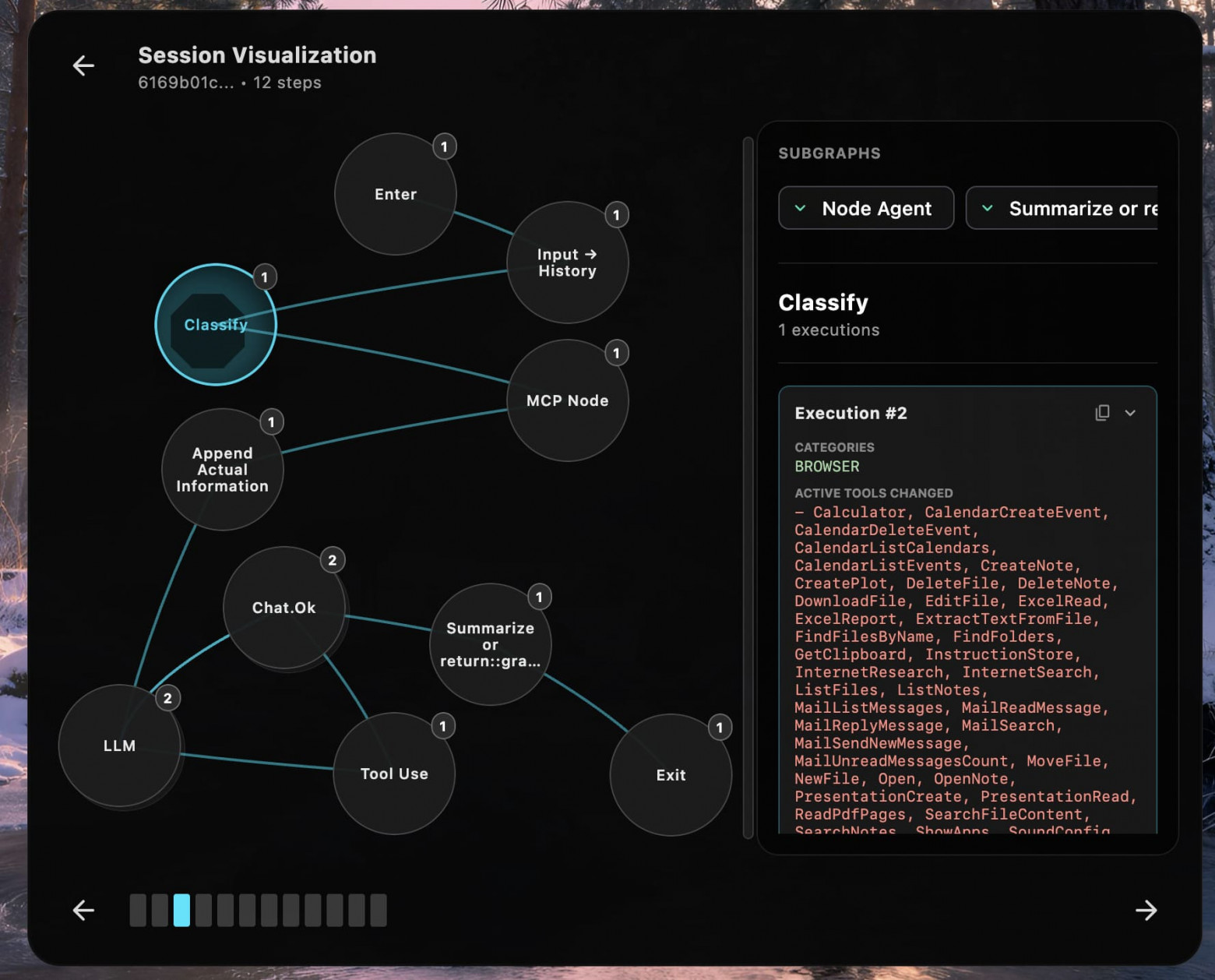
Поскольку мы пишем свои тулы, мы контролируем агента от и до.
-
Любое действие, которое мы считаем опасным, вроде удаления файла или отправки сообщения, нельзя сделать без разрешения пользователя.
-
Агент не может скачивать бинари и запускать их.
-
Агент не может рыться вне папки $HOME.
-
Если пользователь взаимодействует с агентом через телеграм и просит отправить файл с компьютера, то этот файл отправится в сохранённые сообщения (исключена случайная отправка кому-то другому).
Реализуя каждый тул — а у нас их более 70, — мы думаем о том, как сделать его безопасным.
Примеры чужих guardrails
Выбранный нами подход дал случайный бонус — мы оказались очень экономными. Представьте, как выглядит некий средний десктопный агент общего назначения (упрощенный и бездушный):
-
Промпт.
-
Классификация.
-
Добавление своих функций.
-
Добавление функций MCP.
-
Добавление RAG к запросу.
-
Guardrails на запрос к LLM.
-
Получение ответа от LLM.
-
Вызов тулов.
-
Guardrails на проверку параметров для тулов.
-
Guardrails на проверку параметров после вызова тулов.
-
Возвращение результатов LLM.
А теперь сравните это с нашим агентом:
-
Промпт.
-
Классификация.
-
Добавление своих функций.
-
Добавление RAG к запросу.
-
Получение ответа от LLM.
-
Вызов тулов.
-
Возвращение результатов LLM.
Во-первых, нет MCP. Во-вторых, нет guardrails, потому что мы всё это проконтролировали кодом на наших собственных тулах. С guardrails проблема в том, что лидеры индустрии пишут машины Голдберга: регекспы, вызовы LLM для проверки безопасности на разных этапах. Подробнее описал проблему в статье про агентов: раздел Популярные guardrails дают иллюзию безопасности, раздувая систему, а чуть позже утекли исходники Claude Code, несмотря на их Undercover Mode.
Релизы
Февраль 2026. На рынок выходят Claude Cowork, OpenClaw, Perplexity Computer. Кажется, что с релизом тянуть нельзя, тем более что в день появляется с десяток клонов.
Начинаем готовить сборку. Привели в порядок UI, сделали онбординг, получение разрешений. Перенесли переменные окружения в UI-настройки. Сделали сайт, прописали политики безопасности.
Оказалось, собрать релизный билд для macOS не так-то просто: заняло у меня целый недельный отпуск. Подробнее о релизных проблемах я написал в статье про KMP на хабре.
Март 2026. Поддержали умный (и бесплатный) поиск в интернете, локальные модели, добавили метрики, улучшили UI и UX, придумали более удобную работу с текстом.
Как я лично использую «Союз»
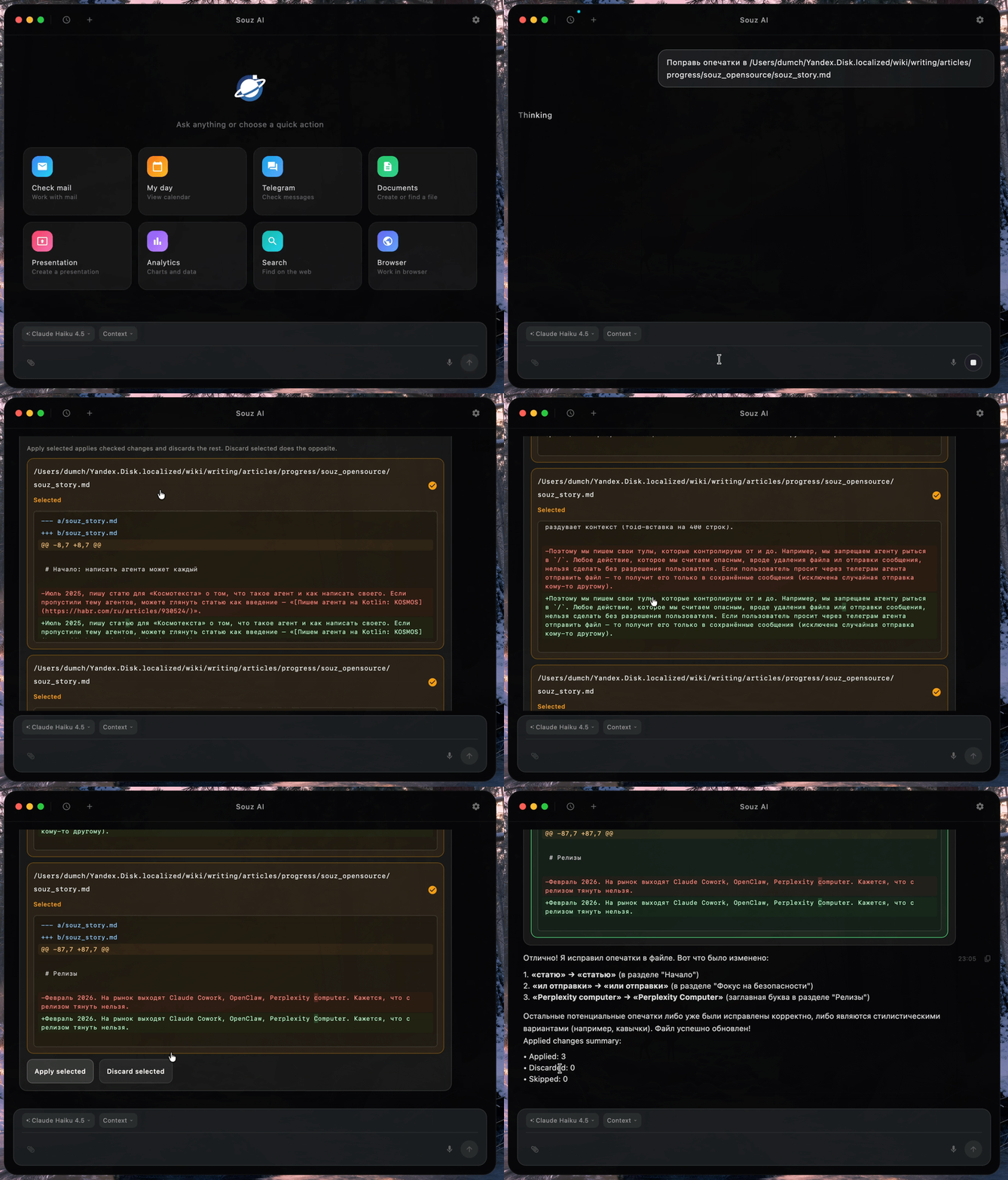
Агент помогает мне работать с текстом: исправлять опечатки, находить ссылки для подтверждения тезисов, приводить критику со ссылками на пруфы. Ниже пример исправления опечаток в этой самой статье:
Что агент может сейчас
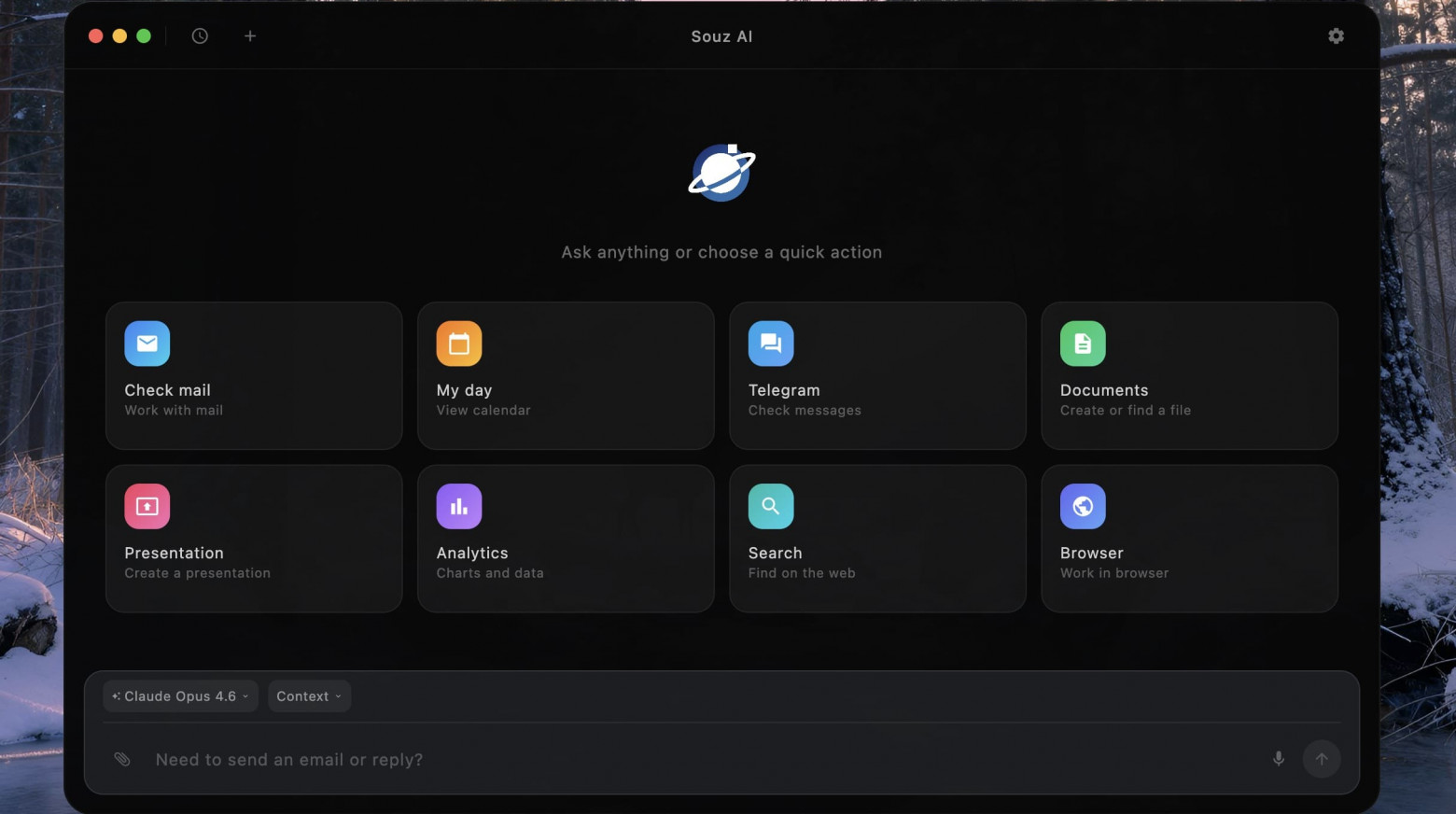
Работа с OS
-
Поддержка работы с doc, pdf, xls, csv, txt, md.
-
CRUD, fuzzy-поиск по файлам.
-
Запись экрана, скриншоты.
-
Заметки, Календарь, Почта, другие приложения.
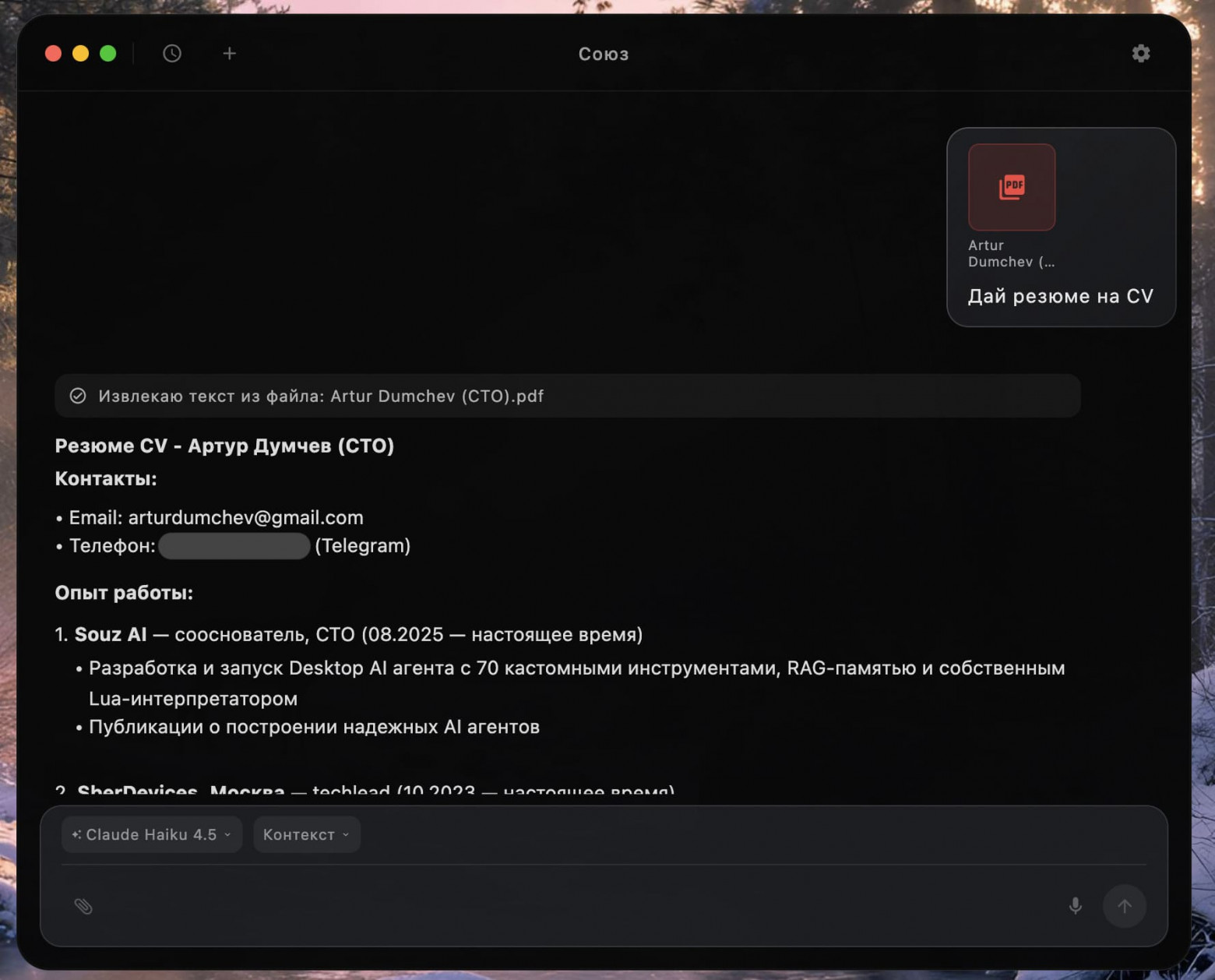
Работа с Телеграмом
-
Автоматический логин (только ввести код и пароль, если есть).
-
Суммаризация чатов, поиск информации в чатах.
-
Отправка и чтение сообщений.
-
Управление агентом через телеграм.
-
Передача файлов с компьютера в телеграм (сохранённые сообщения).
-
Передача файлов из чата с агентом на компьютер.
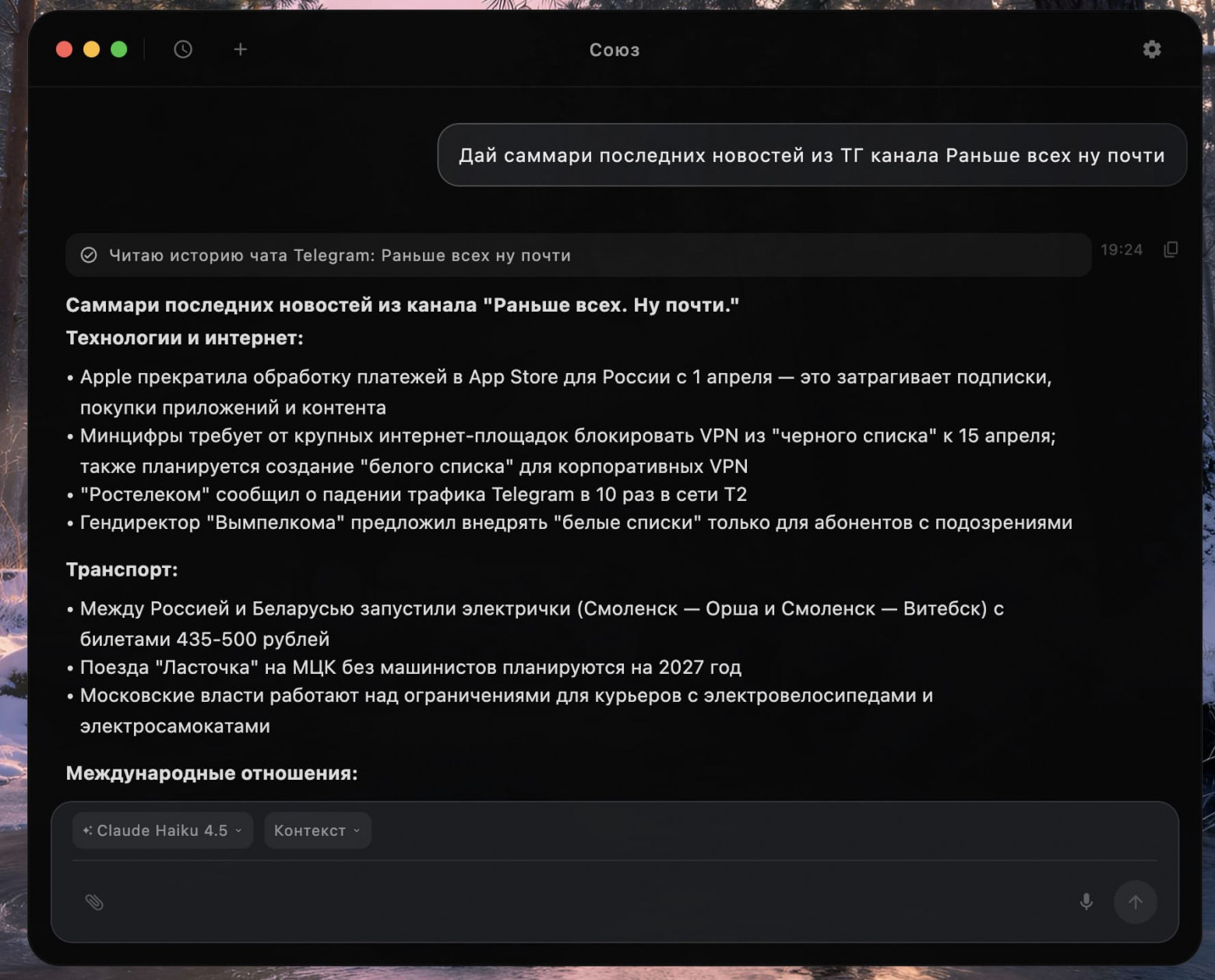
Работа с интернетом и браузером
-
Поиск информации в интернете, полноценный ресерч на заданную тему.
-
Открытие вкладок и закладок браузера.
-
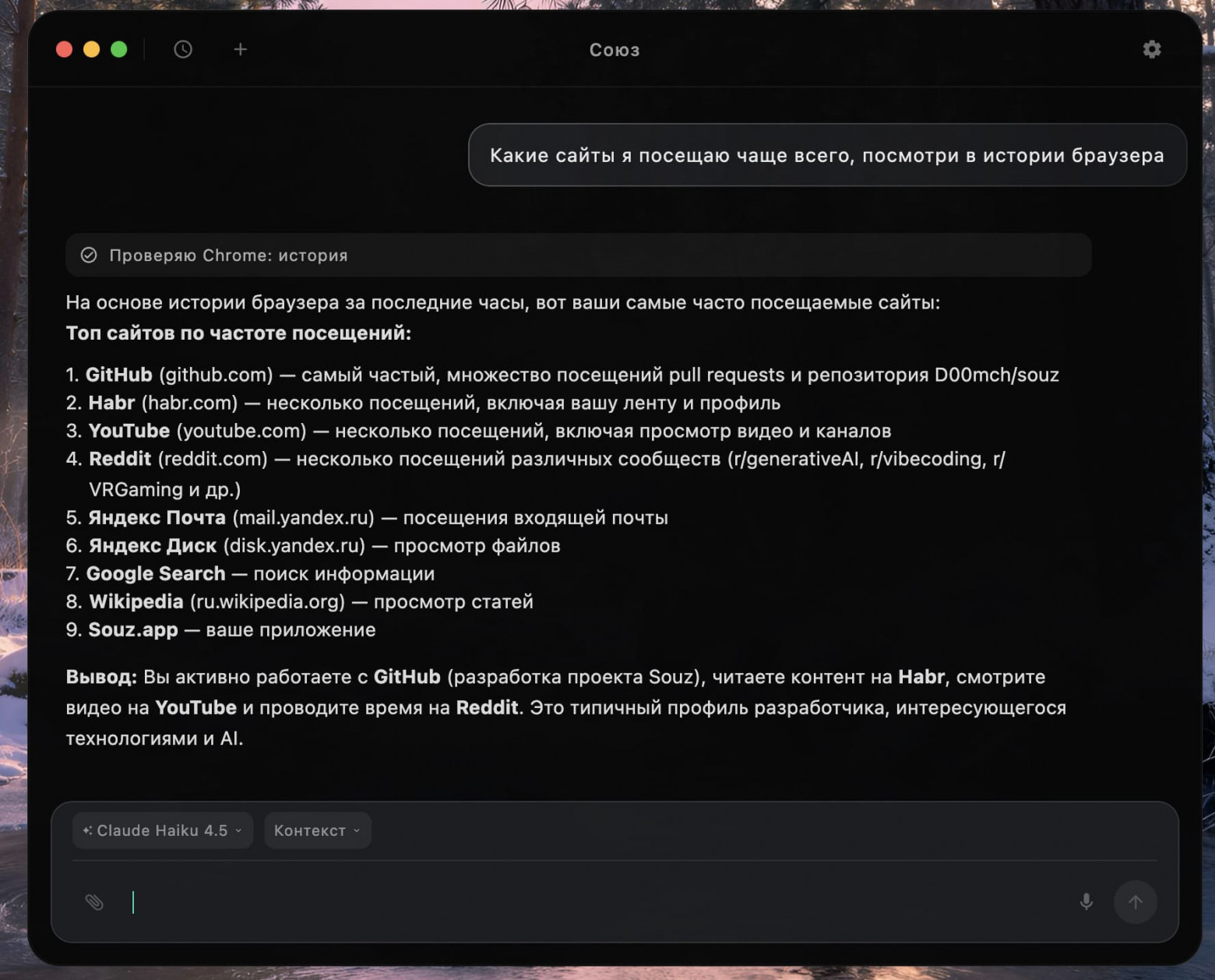
Поиск по истории браузера.
Прочее
-
Анализ таблиц и создание чартов и диаграмм.
-
Презентации — текущее решение «завайбкожено», нам еще предстоит найти подход к тому, как делать презентации качественно.
-
Запоминание команд пользователя.
-
Локальные модели
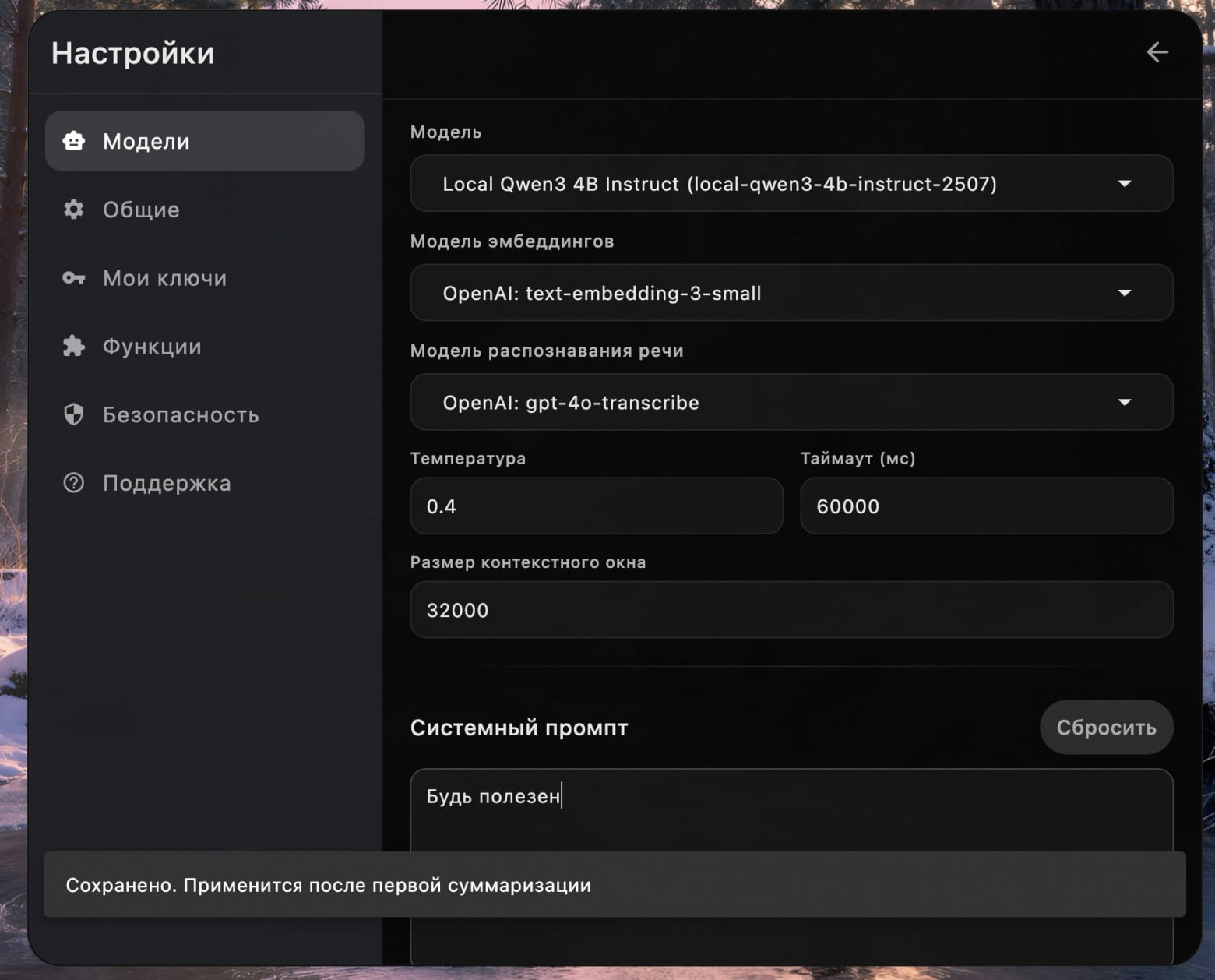
Настройки
В заключение
Другие агенты обещают универсальность, автономность и магию. Мы пошли в другую сторону. Сделали ставку не на «агент может всё», а на «агент не делает лишнего».
Именно этот фокус на ограничениях дал нам и безопасность, и экономию токенов, и более понятную архитектуру. Не через бесконечные guardrails поверх guardrails, а через контроль над собственными тулами и реальными инвариантами в коде.
Пока доступна macOS версия, в планах Windows и Linux. Скачать можно либо на сайте souz.app, либо с GitHub.
Автор: arturdumchev

